
Discussing the potential juxtaposition of indieweb and federated social networks
Category: blog
CassetteBoy FTW https://www.youtube.com/shared?ci=ijgaWny9DvE
CassetteBoy FTW
Acclaimed documentary film Viva Amiga is a retro …
Acclaimed documentary film Viva Amiga is a retro love letter to the freaks, geeks, and geniuses behind the best damned computer ever made: the Amiga. Source: Viva Amiga: The Story of a Beautiful Machine | Documentary
Many people reach a point in their lives …
Many people reach a point in their lives where they see clutter and excessive personal possessions for what they are: distractions and time-sinks that deeply – and negatively – impact one’s life. Minimalism seeks to change this. I am no different; I,…
On the topic of Alexa vs Google Home…
<img class="alignnone" src="https://lh3.googleusercontent.com/-CEidxDx2BmE/WGVpUJ-_OXI/AAAAAAACt-U/A6D-6UGjhLMzgckrvLLk2IykSszzTKZUQCJoC/s0/dayum.gif" alt="" />
On the topic of Alexa vs Google Home…
Wife: “Alexa, can you substitute baking soda for baking powder?”
Alexa: “Hmm, I’m not sure what you meant by that question.”
Wife: “Alexa, can you substitute baking soda for baking powder?”
Alexa: “I’ve added baking powder to your shopping list.”
Wife: “Wtf… Hey Google, can you substitute baking soda for baking powder?”
Google Home: “According to SimplyRecipes, you can substitute baking soda for baking powder, if you increase the amount of acidic ingredients in the recipe to offset the baking soda. You’ll also need much less baking soda as it is 3 times as powerful as baking powder. You’ll need about a teaspoon of vinegar or lemon juice for every 1/2 teaspoon of baking soda.”
Wife: Dayum.
Turn Your MacBook Pro Into Kitt From Knight …
Turn Your MacBook Pro Into Kitt From Knight Rider, Compute Like David Hasselhoff. I finally see the point. <a href="http://gizmodo.com/turn-your-macbook-pro-into-kitt-from-knight-rider-comp-1789382596">http://gizmodo.com/turn-your-macbook-pro-into-kitt-from-knight-rider-comp-1789382596</a>
Updated: Import Chrome passwords into Firefox


Some time back, I wrote a post listing the steps required to migrate passwords stored in Chrome to Firefox.
That post was a bit convoluted, so this post is hopefully an improvement! My intention is to make this process as simple, and reliable, as possible. To succeed, you will need:
- 10 minutes
- Mozilla Firefox, with the Password Exporter add-on installed
- Google Chrome (version 53+)
- LibreOffice
There are five main steps. Let’s get started!
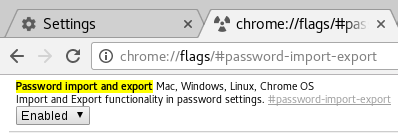
- In Chrome’s address bar, paste:
chrome://flags/#password-import-export…then hit enter.

The option in Chrome should appear like this. Enable it! In the option that is highlighted, Select Enabled and then Relaunch.
- Now, in Chrome, navigate to chrome://settings-frame/passwords, scroll down and click Export. Save the file with a .csv extension.
- Locate the CSV file and right click > Open With > LibreOffice Calc (Alternatively, start LibreOffice Calc and open the CSV file).
- Using LibreOffice Calc, you will need to modify the CSV file to import it into Firefox. Do the following:
- Right-click on row 1 and select ‘Insert Rows Above’. This should insert a single row at the top of the sheet.
- Copy the following and paste into cell A1, using Shift-Ctrl-V (to ensure you paste as plain text):
# Generated by Password Exporter; Export format 1.0.4; Encrypted: false
- You need to move one column, B, to where column D is – but we don’t want to overwrite your data!
- At the top of column B, right-click and select Cut.
- Then right-click again and select Delete Columns – this should remove the now-empty column, and shift-left columns C and D, to positions B and C.
- Now, on column D, select Paste. Your url data should now live in column D.
- Paste the following into cell A2, using Shift-Ctrl-V:
hostname username password formSubmitURL httpRealm usernameField passwordFieldWhen pasting, you may be prompted to select the data format. Select “Unformatted Text” in the list and click OK. We are ok with overwriting other cell contents, so “OK” that. Note, you may need to separate out the headings into columns, left to right.
- Finally, we’re ready to export this data! Go to the File menu, select Save As…In the Save As requester that appears, at the bottom check ‘Edit Filter’ and select ‘Text CSV (.csv)’ in the format drop-down:

Select these options to correctly export your data! - Before we get too excited, there’s just one more step to perform – some textual clean-up!Open up the exported CSV file in your favourite plain-text editor. In the first row, you may see this:
"# Generated by Password Exporter; Export format 1.0.4; Encrypted: false",,,,,,
Delete the leading ” and trailing “,,,,,, from that line.
Secondly, do a Find/Replace on double-commas (,,) making them ,””, (with two quotes inserted) instead. You may need to perform this Find/Replace twice. Now save the file again.
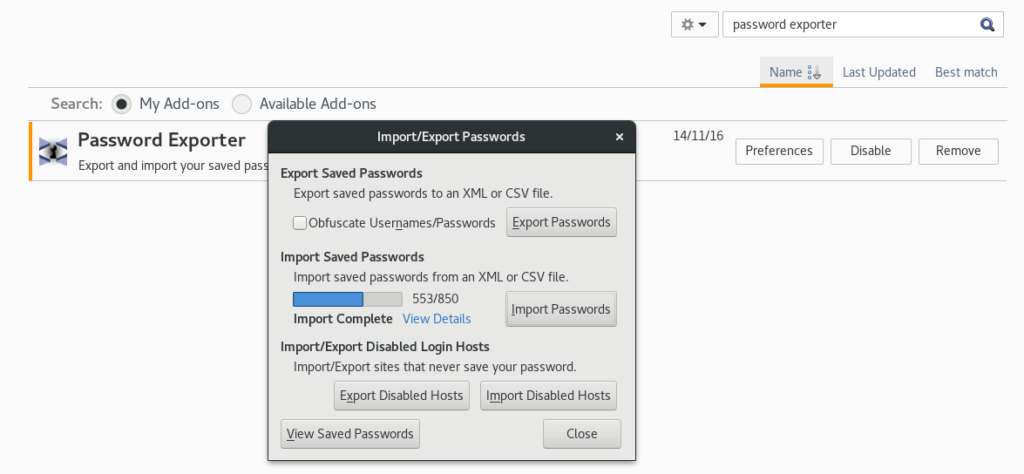
- In Firefox, click on the burger menu and select Add-ons (or just go to about:addons). Find Password Exporter and click Preferences. In the Preferences window, click Import Passwords. Now locate your saved CSV file and load it.You should finally see something like this:

Importing saved passwords into Firefox. Not easy, but definitely rewarding!

Google’s pedestrian Pixel is a photography powerhouse. http://www.theverge.com/2016/10/19/13315354/google-pixel-vs-iphone-comparison-specs-value-camera
Google's pedestrian Pixel is a photography powerhouse.
http://www.theverge.com/2016/10/19/13315354/google-pixel-vs-iphone-comparison-specs-value-camera
Some would-be new owners of Pixel phones are …
<img class="alignnone" src="https://lh3.googleusercontent.com/-3GO-mR5H1So/WAYCLOzj2TI/AAAAAAAKmTE/K1oLu53s3n49HFFCylSJA6UHGDK0iWs5QCJoC/s0/Screenshot_2016-10-18-11-52-24.png" alt="" />
Some would-be new owners of Pixel phones are likely feeling disappointed right now…
FWIW – I ordered mine on 6 Oct and was “allocated” stock.
Shared from Neil “Captain Crash” Howell on Facebook …
<img class="alignnone" src="https://lh3.googleusercontent.com/-R3AB5KZDI2w/V_NJxkS1q8I/AAAAAAAAqNw/HuctH0Llgq48DB8Dlw_9ZtW9259odvS4gCJoC/s0/2016%2B-%2B1" alt="" />
Shared from Neil “Captain Crash” Howell on Facebook :
URGENT APPEAL to any of my friends who live in the Bedford/Milton Keynes area. This is my daughter Kayla Vivienne Mae. She has gone missing this morning. She is 13 years old. She got as far as the school gates and then walked away. She went back home, got changed and then disappeared. If anyone, anyone at all in those area sees her please call me immediately on 07925 159989. Thank you.
#Bedfird #MiltonKeynes #MissingPerson #MissingDaughter #UrgentAppeal #NeilHowell #KaylaVivienneMae