this week (wk 5)

work

  • CRM
  • System: 
  • Products/Quotes system
  • Update profiles
  • Sales
    • 1-2-1s with visdes’s
    • Tie down opps
  • Systems:
    • Update shared accounts to new limits
    • MTA switch
    • Check and update VS disk space
  • PHP 
    • Admin panel tasks
    • build
    • test
    • release
  • Checkout testing
  • [recurring] Organise
    • networking group training 
    • arrange visitors
    • sales leads / prospects / meetings for next week  

    life

    • Kung Fu
    • Salsa
    • Swim

    misc

    • Beer with fellow geek

    last week (wk 4)

    work

    • PHP admin panel tasks
    • scope
    • create / implement
    • test
    • release
  • [recurring] organise
    • networking group training 
    • arrange visitors
    • sales leads / prospects / meetings for next week
  • the ongoing resolution of remaining issues on ccart 0.1 🙂
  • configure router
  • VS sales
  • outline test plan for ccart 0.2
  • life

    • shop for new trainers

    misc

    • complete migration of personal email
    • decide which tech books to get 🙂

    this week (wk 4)

    work

    • PHP admin panel tasks
    • scope
    • create / implement
    • test
    • release
  • [recurring] organise
    • networking group training 
    • arrange visitors
    • sales leads / prospects / meetings for next week
  • the ongoing resolution of remaining issues on ccart 0.1 🙂
  • configure router
  • VS sales
  • outline test plan for ccart 0.2
  • life

    • shop for new trainers

    misc

    • complete migration of personal email
    • decide which tech books to get 🙂

    last week (wk 3)

    work

    • organise
    • networking group training
    • sales leads / prospects / meetings etc.
  • financial year end
    • archive digital & hard copies
    • start new file
  • configure Cisco router
  • implement PHPUnit / Zend Framework unit testing
  • the ongoing resolution of remaining issues on ccart 🙂
  • life

    • organise
    • documents
    • photos
  • reading plan
  • misc

    • complete migration of personal email (50% complete)


    this week (wk 3)

    work

    • organise
      • networking group training
      • sales leads / prospects / meetings etc.
    • financial year end
      • archive digital & hard copies
      • start new file
    • configure Cisco router
    • implement PHPUnit / Zend Framework unit testing
    • the ongoing resolution of remaining issues on ccart 🙂

    life

    • organise
      • documents
      • photos
    • reading plan

    misc

    • complete migration of personal email

    last week (wk 2)


    work

    • organise
      • browser bookmarks
      • documents
    • financial year-end
      • archive digital & hard copies
      • start new file
    • business cash flow planning
    • configure Cisco router
    • resolve remaining issues on ccart

    life

    • organise
      • documents
    • reading plan
    • go out, eat curry

    misc

    • complete migration of personal email

    Linux User & Developer magazine
    – a good read while having your car MOT’d

    I was delighted to take my car to Swiftest in Aldershot this morning, for one simple reason (see pic – and no, it wasn’t because of the coffee, although that helps!)

    Female Friendly policy:
    A Good ThingTM

    In fact, there are two good reasons to use Swiftest in Aldershot.  Three, actually.

    First, the aforementioned reading material.

    Second, the professional, helpful and polite staff (Rob, James & co).

    Lastly, it has to be the “Female Friendly” policy.  I was there first thing (7:30am) for my car to be MOT’d, and the only other two customers to come in at this early hour were both female.  I’d say that was testimony enough.

    this week (wk 2)

    work

    • organise
      • browser bookmarks
      • documents
    • financial year-end
      • archive digital & hard copies
      • start new file
    • business cash flow planning
    • configure Cisco router
    • resolve remaining issues on ccart

    life

    • organise
      • documents
    • reading plan
    • go out, eat curry 

    misc

    • complete migration of personal email

    last week (wk 1)

    work

    • bin the old chair 🙂
    • organise
      • customer appointments / projects
      • browser bookmarks
      • documents
    • financial year-end
      • archive digital & hard copies
      • start new file
    • business cash flow planning
    • configure Cisco router
    • visit dc to perform maintenance
    • resolve remaining issues on ccart

    life

    • organise
      • mp3s
      • documents
    • reading plan
    • get busted ankle checked out
    • schedule food/fit

    misc

    • complete migration of personal email

    /lib/ld-linux.so.2 missing? libXext.so.6 can’t be found?

    I recently [at the original time of writing] installed Fedora 11 [x86_64] on a test machine, to see how the development desktop build of my favourite Linux distribution is doing – and it’s very nice indeed.

    I tried to install Zend Studio 5.5 and soon came across problems, which I found out related to not having 32-bit versions of Xorg and glibc installed. To remedy this, ensure you follow these steps:

    su -c 'yum groupinstall Java'
    su -c 'yum install glibc.i686 libXext.i586'

    Once installed, I was able to fire up the Zend Development Environment:

    /usr/local/Zend/ZendStudio-5.5.1/bin/ZDE

    .. and it was running on the native (OpenJDK) 64-bit JAVA runtime! How’s that for progress!

    I confess: this is a problem without an obvious solution.

    As a server administrator managing tens, possibly hundreds, of domains via Parallels’ Plesk control panel system, you may be forgiven for getting frustrated, from time to time.  It happens.

    While Plesk is a big time-saver for many tasks, there are occasional quirks which only help to irritate.  One of these being SSL certificates.

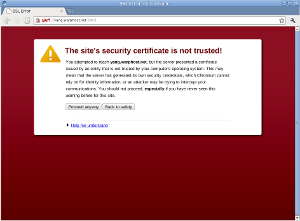
    Security warning in Chromium

    The Plesk control panel comes with a standard SSL certificate which is used to encrypt all HTTPS connections to/from the server by default.  Most server administrators will probably want to replace this with a certificate that correctly identifies their specific server.

    The usual route, through Plesk 9.5.x would be to log in, click Settings, click SSL Certificates, and then create / delete certificates accordingly until you have a new default server certificate.  The final step would be to tick the checkbox next to the new default certificate and click “Secure Control Panel”.

    This gives you the impression that the new certificate is now used by the control panel.  It isn’t.

    So, the next morning, you’ll probably receive one of these by email:

    ################# SSL Certificate Warning ################

    Certificate for hostname 'plesk', in file:
    /etc/httpd/conf/httpd.pem

    The certificate needs to be renewed; this can be done
    using the 'genkey' program.

    Browsers will not be able to correctly connect to this
    web site using SSL until the certificate is renewed.

    ##########################################################
    Generated by certwatch(1)
    
    
    "Hmm", you think, "this should have been updated when I 'Secured the Control Panel'".  Yes, it should.  So, the next logical step would be to edit httpd.pem and replace the Key and Certificate values of this file with those displayed through Plesk's SSL Certificates section.  Then simply restart the web server.  Ha ha! Fail!  Browsing to the control panel still results in the security warning. What gives?!! 
     
    After you have restarted the web server many times, both via the operating system's /etc/init.d method and via /usr/local/psa/admin/bin/websrvmng, you conclude that, actually, this is also not the certificate that requires updating.  So, which certificate file stored on the system is the one being served by Plesk?

    Good question.  While you're searching for an answer, try checking/editing /usr/local/psa/admin/conf/httpsd.pem  and  /usr/local/psa/etc/httpsd.pem.  Nope?

    Oh well, how about just resorting to a reboot and taking down everyone's services for a moment? ... Not ideal, but it works.  But this is not the right way!!!  :-(
     
    ********* UPDATE 23/11/2011 ***********
     
    I have stumbled upon the right way to do this.  In a shell: 

    cd /usr/local/psa/etc/
    mv httpsd.pem httpsd.pem.old
    cp /usr/local/psa/admin/conf/httpsd.pem .
    service psa restart

    With the aim of simplifying it all in 2011…

    work

    • bin the old chair 🙂
    • organise
      • customer appointments / projects
      • browser bookmarks
      • documents
    • financial year-end
      • archive digital & hard copies
      • start new file
    • business cash flow planning
    • configure Cisco router
    • visit dc to perform maintenance
    • resolve remaining issues on ccart

    life

    • organise
      • mp3s
      • documents
    • reading plan
    • get busted ankle checked out
    • schedule food/fit

    misc

    • complete migration of personal email

    This week
    Work
    • [ ] Refine some elements on Zend Framework eCommerce system
    • [ ] Prepare 10 min presentation
      Zend Framework logo.
    • [ ] Arrange projector / screen
  • [ ] Attend networking event
  • [ ] Set up sales meeting
  • [ ] Finances
  • [ ] Progress Christmas cards
  • [ ] Catch-up phone calls
  • Life

    • [ ] Food shop
    • [ ] Swimming x 2
    • [ ] Kung Fu

    Misc

    • [ ] Get presents/cards
    • [ ] Cook something I’ve never cooked before
    • [ ] Tidy up downloads/images
    • [ ] Time to wash the car / dog (?)
    Enhanced by Zemanta

    I remember once watching a documentary on Arnold Schwarzenegger’s bodybuilding career (or was it this one?) in the ’70s and early ’80s.

    All of the bodybuilders in that golden era had their own training programme managers and promoters.  I recall that one manager/promoter, working for another bodybuilder, loved his own quotes.

    These quotes would range from the urbane, “the pen is mightier than the muscle”, to somewhat more characteristically humorous: “remember the golden rule: he who has the gold, makes the rules“.

    Well, in the completely unrelated world of PHP programming, this perl of wisdom (sic joke) is worth hanging on to.  Why?  Well, if you have ever used PHP’s variable variables, knowledge of the correct syntax is worth its weight in gold.  It’ll save hours, if not days, of debugging.
    So, anyway, I’ve been coding a calendar system for a valued client for the past ten days or so.  My first attempt I pretty much scrapped as it got too complex and almost impossible to debug.  The second version is much better, except for one issue which has been giving me grief until now.

    Variable variables in PHP are extremely useful, but I throw in a word of caution immediately: use them sparingly.  It can be easy to quickly lose track of what’s called what and why it’s there.  Especially if any single script is 400+ lines long.

    To set a variable variable, it’s easier to start off giving a value to an ordinary variable:

    $myVar = "myVarVar";

    Now, I want to create a variable variable with the name $myVarVar, so this is how it’s done:


    $$myVar = "this is my variable variable";

    To see the contents of the variable variable, you can do either of the following:


    echo $$myVar;     // or
    echo $myVarVar; 

    Both will output “this is my variable variable” to the screen/page.

    Snooker Loopy
    Things start getting interesting when you introduce arrays and loops. Take the following example:


    for($i=0; $i<4; $i++) {
    $myVar = "myVarVar".$i;
    $$myVar = "  Variable variable £".$i;
    }

    creates and produces:

    echo $myVarVar0; // "Variable variable #0"
    echo $myVarVar1; // "Variable variable #1"
    echo $myVarVar2; // "Variable variable #2"
    echo $myVarVar3; // "Variable variable #3"