
http://www.sugarcrm.com/forums/showthread.php?t=18866
http://www.sugarcrm.com/forums/showthread.php?t=68799


http://www.sugarcrm.com/forums/showthread.php?t=18866
http://www.sugarcrm.com/forums/showthread.php?t=68799
In Windows Explorer :

Click Organize / Fold and Search options / View [tab] / Files and Folders section / untick "Always show icons, never thumbnails"

Seriously - what ****-head, numb-nut set this as default ??????

Oh and you need to close and restart Explorer to see the effect.
That's like washing your car and having to get into & out of it before you see the clean car. (:
(from a friend, reproduced with permission)
this week (wk 5)
work
life
misc
last week (wk 4)
work
life
misc
this week (wk 4)
work
life
misc
last week (wk 3)
work
life
misc
this week (wk 3)
work
life
misc
last week (wk 2)
work
life
misc
|
|
| Linux User & Developer magazine – a good read while having your car MOT’d |
I was delighted to take my car to Swiftest in Aldershot this morning, for one simple reason (see pic – and no, it wasn’t because of the coffee, although that helps!)
 |
| Female Friendly policy: A Good ThingTM |
In fact, there are two good reasons to use Swiftest in Aldershot. Three, actually.
First, the aforementioned reading material.
Second, the professional, helpful and polite staff (Rob, James & co).
Lastly, it has to be the “Female Friendly” policy. I was there first thing (7:30am) for my car to be MOT’d, and the only other two customers to come in at this early hour were both female. I’d say that was testimony enough.
this week (wk 2)
work
life
misc
last week (wk 1)
work
life
misc
/lib/ld-linux.so.2 missing? libXext.so.6 can’t be found?
I recently [at the original time of writing] installed Fedora 11 [x86_64] on a test machine, to see how the development desktop build of my favourite Linux distribution is doing – and it’s very nice indeed.
I tried to install Zend Studio 5.5 and soon came across problems, which I found out related to not having 32-bit versions of Xorg and glibc installed. To remedy this, ensure you follow these steps:
su -c 'yum groupinstall Java'

su -c 'yum install glibc.i686 libXext.i586'
Once installed, I was able to fire up the Zend Development Environment:
/usr/local/Zend/ZendStudio-5.5.1/bin/ZDE
.. and it was running on the native (OpenJDK) 64-bit JAVA runtime! How’s that for progress!
I confess: this is a problem without an obvious solution.
As a server administrator managing tens, possibly hundreds, of domains via Parallels’ Plesk control panel system, you may be forgiven for getting frustrated, from time to time. It happens.
While Plesk is a big time-saver for many tasks, there are occasional quirks which only help to irritate. One of these being SSL certificates.
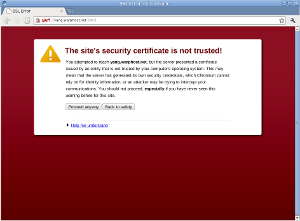 |
| Security warning in Chromium |
The Plesk control panel comes with a standard SSL certificate which is used to encrypt all HTTPS connections to/from the server by default. Most server administrators will probably want to replace this with a certificate that correctly identifies their specific server.
The usual route, through Plesk 9.5.x would be to log in, click Settings, click SSL Certificates, and then create / delete certificates accordingly until you have a new default server certificate. The final step would be to tick the checkbox next to the new default certificate and click “Secure Control Panel”.
This gives you the impression that the new certificate is now used by the control panel. It isn’t.
So, the next morning, you’ll probably receive one of these by email:
################# SSL Certificate Warning ################

 Certificate for hostname 'plesk', in file:
    /etc/httpd/conf/httpd.pem

 The certificate needs to be renewed; this can be done
 using the 'genkey' program.

 Browsers will not be able to correctly connect to this
 web site using SSL until the certificate is renewed.

 ##########################################################
                                 Generated by certwatch(1)
"Hmm", you think, "this should have been updated when I 'Secured the Control Panel'". Yes, it should. So, the next logical step would be to edit httpd.pem and replace the Key and Certificate values of this file with those displayed through Plesk's SSL Certificates section. Then simply restart the web server. Ha ha! Fail! Browsing to the control panel still results in the security warning. What gives?!!
After you have restarted the web server many times, both via the operating system's /etc/init.d method and via /usr/local/psa/admin/bin/websrvmng, you conclude that, actually, this is also not the certificate that requires updating. So, which certificate file stored on the system is the one being served by Plesk?
Good question. While you're searching for an answer, try checking/editing /usr/local/psa/admin/conf/httpsd.pem and /usr/local/psa/etc/httpsd.pem. Nope?
Oh well, how about just resorting to a reboot and taking down everyone's services for a moment? ... Not ideal, but it works. But this is not the right way!!! :-(
********* UPDATE 23/11/2011 ***********
I have stumbled upon the right way to do this. In a shell:
cd /usr/local/psa/etc/
mv httpsd.pem httpsd.pem.old
cp /usr/local/psa/admin/conf/httpsd.pem .
service psa restart
With the aim of simplifying it all in 2011…
work
life
misc
