
Ravensbourne campus entrance
The campus venue where the magic happens.

MozFest

Let’s be clear from the outset: there’s no word that adequately defines MozFest.  The Mozilla Festival is, simply, crazy. Perhaps it’s more kindly described as chaotic? Possibly. A loosely-coupled set of talks, discussion groups, workshops and hackathons, roughly organised into allocated floors, feed the strangely-complimenting hemispheres of work and relaxation.
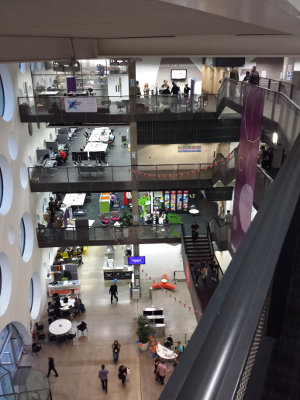
Internal cross-section of Ravensbourne's floors
Nothing can prepare you for the 9 floors of intensity.

How MozFest works

Starting from the seeming calm of Ravensbourne’s smart entrance, you stroll in, unaware of the soon-experienced confusion. A bewildering and befuddling set of expectations and realisations come and go in rapid succession. From the very first thought – “ok, I’m signed in – what now?”, to the second – “perhaps I need to go upstairs?”, third – “or do I? there’s no obvious signage, just a load of small notices”…. and so on, descending quickly but briefly into self-doubt before emerging victorious from the uneasy, childlike dependency you have on others’ goodwill.

Volunteers in t-shirts, I’m looking at you. Thanks.

The opening evening started this year with the Science Fair, which featured – in my experience – a set of exciting hardware and software projects which were all in some way web-enabled, or web-connected, or web-controlled. Think Internet of Things, but built by enthusiasts, tinkerers and hackers – the way it should be.

“Open Hardware” projects, interactive story-telling, video games and robots being controlled by the orientation of the smartphone (by virtue of its gyroscopic capability).. the demonstration of genius and creativity is not even limited by the hardware available. If it didn’t already exist, it got designed and built.

An Open Web, for Free Society
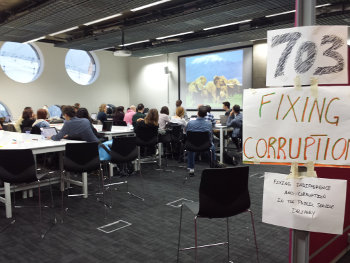
Seminar on fixing corruption in public services
A multitude of social and policy-driven themes permeated MozFest

As made clear from the opening keynotes on Saturday morning, MozFest is not a place for debate. Don’t think this as a bad thing. The intention is simply to help communicate ideas, as opposed to getting bogged down in the mire of detail. “Free” vs “Open”? Not here. The advice given was to use one’s ears much more than one’s mouth, and it’s sound advice – no pun intended. I have generally been considered a good listener, so I felt at home not having to “prove” anything by making a point. There was no point. 😉

Several themes were introduced in the keynote speeches which really resonated with the attendees – sorry, the participants of MozFest. That of online security and surveillance, more than two years after Edward Snowden’s revelations, was as prominent as ever. Participation was another key theme, and to me one of the most poignant ideas of the whole weekend. Participation was not encouraged or expected; it was simply threaded into the very fabric of one’s presence. You participated, to a lesser of greater degree. This was one of the most socially inclusive experiences I have ever known.

Stories by the Fireside

I cannot overstate how social inclusion at all levels permeated MozFest. From the smallest of teams – 2 individuals, to the largest groups I saw, people were constantly engaged in conversation, development – personal, social and technical, and – perhaps surprisingly – quiet reflection, too.

Image of cupcakes with unusual toppings
Creativity and individuality – there’s a lot of it

Quiet zones were available for those needing a little downtime. The cerebral intensity of the weekend is clearly felt.

The concept of the fire-side story appeared several times, reminding us that the web isn’t just a resource in and of itself, but rather a medium to convey information.  Storytelling, one of the oldest methods of such conveyance, was a prescient theme. Represented through journalism, community and leadership, the scale of recognition (and a reminder) that the web is, primarily, a means to convey stories, took me somewhat aback. It’s inescpable logic, almost lost amidst the omnipresent noise of today’s social media.

Looking to the Future

Not only was MozFest a means to appreciate, understand and build upon the means to share information, it was also firmly invested in its future. Science and education were extremely well represented by group talks, workshops and forums.
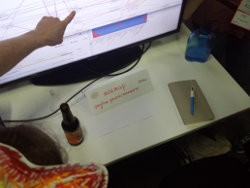
Code visualising MozFest pathways on GitHub
Pathways were a means for guiding participants through the plethora of activities.

In fact, the sheer number of topics on offer, and guaranteed clashing of events sure to interest you, simply went to prove one thing: the web is not just big, it’s bigger than you can imagine. How the event planners and coordinators of MozFest actually found a way to combine the multitude of themes and interests into “Spaces” and “Pathways” is a huge credit to the thought-leadership behind this event. By encouraging leadership, the Mozilla Foundaiton has shown itself to be a more-than-capable leader in as diverse a field as there can be.

What I learned at MozFest

On arrival, I didn’t know what to expect. First-timers don’t.  I had a vague incling that I would face a learning curve, adapting to the culture and activities of the event. Like a wandering spirit, I probably stared starry-eyed at the overwhelming number of quickly-scribbled “adverts”, pinned, taped and hung up everywhere, telling me about “this event” or “that workshop”.  Even now, in reflection, I feel that the above post barely scratches the surface of the experience.

It’s sensory-overload, pure and simple. 🙂

MozFest is a journey. Physically, many people made long journeys to attend and participate. To those people, I am grateful – you have made my life richer by your efforts. But psychologically, emotionally and intellectually MozFest is so much more than the sum of its multitudinous parts: It’s an idea, a belief that together we can build something better for much time to come; build something to last that has intrinsic “goodness”. And we are not actually talking about the web. The conversation has evolved. The web might be the medium, but the story is now about us.

The question is, how do we nurture our most sublime nature, and be all we can?

I recently kept getting this problem in Firefox:

Screen capture of error message in Firefox
Are you seeing this a lot when using Firefox / Iceweasel / etc?

If you use Firefox and have recently come across this error, fear not.  This intention of this page is to resolve these errors once and for all!

There are a few key steps to resolving it:

  1. Clear Cookies & Cache
  2. Use System Proxy
  3. Disable all Add-ons
  4. Close and restart browser
  5. Try again


The instructions provide clues, but don’t spell out, how to set up org2blog for multiple blogs. https://github.com/punchagan/org2blog

(setq org2blog/wp-blog-alist 
  '(("wordpress" :url "http://username.wordpress.com/xmlrpc.php"
     :username "username"
     :default-title "Hello World"
     :default-categories ("org2blog" "emacs")
     :tags-as-categories nil) 
    ("my-blog" :url "http://username.server.com/xmlrpc.php"
     :username "admin")))

But what if you don’t want to specify your username and password in this multi-site set-up?

The answer lies in expanding on the elisp provided.

(let 

 (creds-stevedowe creds-warpuni creds-status)
 (add-to-list 'auth-sources "~/.netrc") 
 
 (setq creds-stevedowe (auth-source-user-and-password "stevedowe.me")) 
 (setq creds-warpuni (auth-source-user-and-password "warpuni.com")) 
 (setq creds-status (auth-source-user-and-password "status.warphost.net"))

 (setq org2blog/wp-blog-alist 
  `( ("stevedowe.me"
      :url "https://dowe.uk/xmlrpc.php"
      :default-categories ("me" "process" "things" "world")
      :tags-as-categories nil
      :username ,(car creds-stevedowe)
      :password ,(cadr creds-stevedowe)) 

     ("warpuni.com"
      :url "https://warpuni.com/xmlrpc.php"
      :default-categories ("Analytics","BioData","FreeSoftware","Internet","Mobile","News","Productivity","Security","Social" "Support")
      :tags-as-categories nil
      :username ,(car creds-warpuni)
      :password ,(cadr creds-warpuni)) 

     ("status.warphost.net"
      :url "https://status.warphost.net/xmlrpc.php"
      :tags-as-categories nil
      :username ,(car creds-status)
      :password ,(cadr creds-status)))))

[ This is a legacy post. Some details may no longer be relevant to modern software implementations. ]

I had been cultivating a fascination with Jekyll for blogging for a short while. It looked oh so clean, and minimalist, and sleek. It has its fans, for sure, and I am one of them.

If I were starting my blog from this day, I would almost certainly consider using Jekyll for it, rather than WordPress.

WordPress: better the devil?

But, I am not. Back in 2007 (can it really be so long ago?!), when I started blogging, I didn’t give much thought to my requirements eight years down the line. And the funny thing is, they have hardly changed.

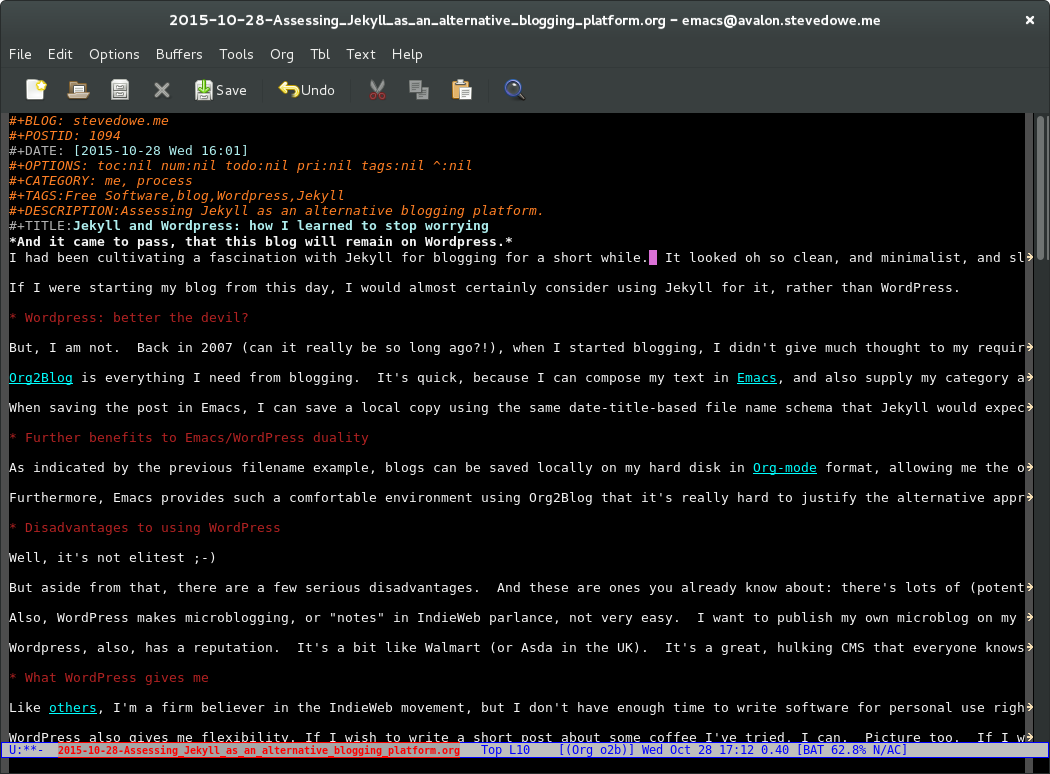
Org2Blog is everything I need from blogging. It’s quick, because I can compose my text in Emacs, and also supply my category and tag information directly too.

When saving the post in Emacs, I can save a local copy using the same date-title-based file name schema that Jekyll would expect (e.g.: 2015-10-28-Assessing_Jekyll_as_an_alternative_blogging_platform.org).

Further benefits to Emacs/WordPress duality

Emacs Rocks.
Emacs Rocks.

As indicated by the previous filename example, blogs can be saved locally on my hard disk in Org-mode format, allowing me the option later on to convert everything for a Jekyll-based future. In other words, making the decision to hard-switch from one system or another need not be rushed and can, in fact, be assessed based on technical need.

Another “turn-off” from Jekyll is that, despite various attempts to make it easy to migrate WordPress posts, I found the process awkward and the documentation confusing. There is more than one way to skin this cat.
For me, Emacs provides such a comfortable environment using Org2Blog that it’s really hard to justify the alternative approaches of org-jekyll or Org+Jekyll.

Disadvantages to using WordPress

Well, it’s not elitest 😉

But aside from that, there are a few serious disadvantages. And these are ones you already know about: there’s lots of (potentially-vulnerable) PHP running, which is a security risk and also makes WordPress … slow.

Also, WordPress makes microblogging, or “notes” in IndieWeb parlance, not very easy. I want to publish my own microblog on my site and publish it elsewhere, but this will take futher investigation.

WordPress, also, has a reputation. It’s a bit like Walmart (or Asda in the UK). It’s a great, hulking CMS that everyone knows. It’s everywhere. Everyone uses it. Which means there’s less that’s “special” about it. And that’s a shame, because for all of that it’s really quite brilliant.

What WordPress gives me

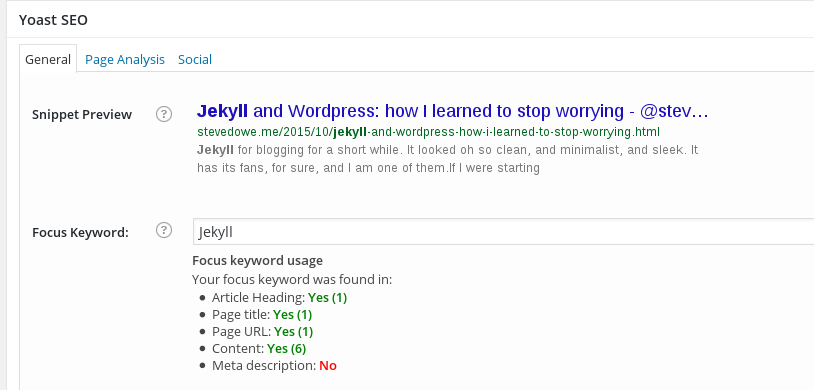
Yoast SEO screenshot
Managing SEO settings per-post in WordPress

Like others, I’m a firm believer in the IndieWeb movement, but I don’t have enough time to write software for personal use right now. Luckily, many talented and dedicated individuals have stepped up and kindly donated their time and code to enable the IndieWeb on WordPress sites. This suits me down to the ground. At least I can support the movement by advocating and using their code.

WordPress also gives me flexibility. If I wish to write a short post about some coffee I’ve tried, I can. Picture too. If I wish to incorporate a video or music in a page fo rsome reason, the built-in editor makes that effortless. As it does, embedding a tweet too. WordPress is doing favours for the web at large, by keeping our writing options open and encouraging open sharing, rather than feeding us silo-centric drivel-data that we see so often from certain social networks!

One last thing WordPress gives is the ability for people who are not computer-confident to use a device like a Chromebook, or even their phone, and still provide a compelling and easy-to-use platform for sharing content.

There is a growing movement.  

The movement is towards a free web, unimpeded by the silos that threaten to own us, and liberated from social-networking norms that diminish our individuality.

And yet, there isn’t actually one movement; there’s two.  In fact, there are many more than two, but I’ll focus on just these for now.


Friendica

Friendica is a social networking platform which is decentralised, distributed and fully privacy-respecting.  It is, of course, open source too.  Friendica’s purpose is to be an ‘alternative to those “creepy” social networks that don’t really care about your privacy’.  It is primarily a web site with components that interact with other social networks (Facebook, Twitter, etc) as well as other instances of Friendica.

Friendica requires self-hosting.


Indieweb

Conversely, the “Indieweb” is more of a concept than a specific implementation.  Its guiding principle is that “When you post something on the web, it should belong to you, not a corporation.”  Although similar ideologically to Friendica, the implementation is less defined.  Some people have implemented it via WordPress plugins, others through Jekyll and other static blogging systems.

Indieweb’s principles can even be implemented in “closed” systems, provided the data can always be accessed by its owner.


A 200 word post.

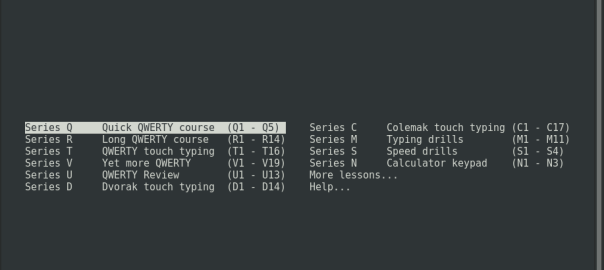
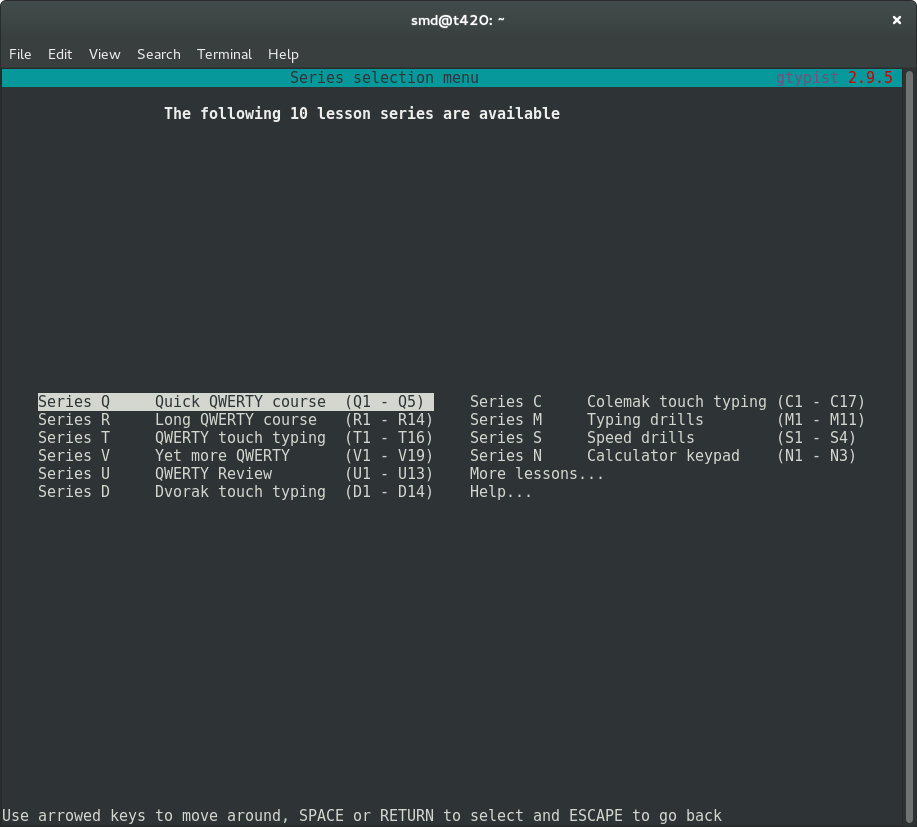
Gtypist menu options
GNOME Terminal showing gtypist menu

Looking for a free software program to help me learn to touch-type, and shortly after my search started I found GNU Typist.  And GNU Typist (gtypist) is a gem.

The instructions are simple and the purpose of the program is equally simple: to “condition” the user into adopting and maintaining good typing habits.  After starting the basic lessons (“Quick QWERTY course”), it soon became clear that my touch-typing capability was far poorer than I had hoped and my typing speed these days is generally just luck-driven.

Thankfully, a considerate fellow called Simon Baldwin decided to write gtypist, and here we are.  The online documentation is equally useful; not only do you get help regarding how to acquire, install and invoke gtypist on your machine, but also a list of alternative free software typing programs which are a good fit in various situations (general, education, games-playing, etc).  Like most GNU software, a man page is also provided.

It is so easy to take this effort for granted, and yet how useful is this resource! Such is the way with free software: quite often, somebody already had that itch and had to scratch it.

Yes, I really could not think of a better title for this. 🙂

Recently I added a new drive, connected by USB, to a test server. It was for sharing with a virtual machine running on that server.

Chain of oops

When I connected the drive to the host, I decided to create a volume group and logical volume on it. This would have been fine, were it not that I then attempted to mount this logical volume in the host, rather than the guest.  The problem, as I later discovered, was that I’d created a volume group in the host, with the same name as a volume group in the guest.  Again, this would have been fine on its own, but the chain of errors was complete when I made the following next moves:

  • Shared the physical disk with the virtual machine
  • Activated the LVM volume group on the physical disk inside the virtual machine’s operating system (debian)

To its credit, LVM seemed to handle this quite well, and (if memory serves) merged my new logical volumes into one great volume group.

Identity crisis

Switching between different “hosts” (physical host and virtual guest) to edit logical volumes is not very clever, though.  The reason is that lvm, within an operating system with drives available at certain locations, will update those drives’ metadata where each drive is a physical disk that is assigned to a volume group.

Let me put this another way:  if you have /dev/sda1, /dev/sdb1 and /dev/sdc1 all as PVs (physical volumes) that belong to a VG (volume group), then making a change to the volume group – e.g. something simple like vgrename – will affect those three physical volume’s metadata.

Now, once you have finished doing this in the physical host and start playing around with the VG in your guest’s operating system, things aren’t going to look quite right.  If you exported /dev/sdc1 from the host to the guest, the guest might:

  • recognise the device at another location, such as /dev/sdb1
  • look at it with lvm and wonder where /dev/sda1 and /dev/sdc1 are…
  • let you edit this physical volume’s metadata (using LVM tools) in such a way that you cause further problems for yourself back in the physical host, if you planed to share it back there again.

The golden rules for an easy life, so far, are:

  • Don’t share volume groups and logical volumes between hypervisors and guests.
  • You can share a physical disk to a guest, but if you intend to use a logical volume on it within the guest, create it within the guest.  And use it only within the guest.
  • If you must manage and share logical volumes from the host to the guest, use NFS.

If you have already created a nightmare of “unknown” disks and missing PVs…

It’s not too difficult to remedy a tricky situation with messed up volume groups.  If you are absolutely, positively, 100% certain that you no longer require the missing physical volumes in your VG, then there are actually only three (or four) commands you need:

# lvm vgreduce --removemissing -f <volume group name>

This attempts to remove the missing PVs from your VG and writes an up-to-date config file in /etc/lvm/backup/.  If you inspect that file you’ll see a physical_volumes { } stanza which encompasses the physical volumes now remaining in your VG.

However, pay close attention to the status attribute of each PV.   You may also see the remaining entry has:

status = ["MISSING"]

If you then attempt a

# vgchange -ay <volume group name>

you may find that the VG will not become active and this file again contains several entries, related to the missing PVs that you thought you’d just removed.  The reason for this is that the remaining PV(s) have old meta-data which hasn’t been updated by LVM when you did that lvm vgreduce, earlier.  Fear not.

Issue:

# lvm vgextend --restoremissing <volume group name> /path/to/PV

e.g. /path/to/PV might be /dev/sdb1 – you’ll need to know this, no guesses 🙂

After this, inspect the backup config file that you looked at previously.  The status should have changed from “missing” to “allocatable”.  However, the missing PVs will still be present, so let’s get rid of them:

# lvm vgreduce --removemissing -f <volume group name>

Now take one more look at that config file.  It should just contain the PVs that are present and assigned to your VG.

Try activating the VG:

# vgchange -ay <volume group name>

1 logical volume(s) in volume group "<volume group name>" now active

If you’ve got this far, you’re basically on the home straight.  Simply mount the LV on the file system and away you go!

Using Debian Wheezy, I found that trying to use Evolution as my task source for hamster-applet was not working.

I enabled Evolution as my source for tasks in Hamster. When executing hamster-time-tracker from the CLI, an error would appear in my terminal:

** (Time Tracker:14088): WARNING **: Failed to open calendar (type 1): Authentication required

I first thought that the problem was with hamster, that it was an outdated version. So I downloaded the source from github, re-built it and installed it on my system (after removing the old hamster). This didn’t help. But, as I had the source handy, I thought I’d take a look.

In the hamster-master/src/hamster directory is a file called external.py and, in that, this:

try:
import evolution
from evolution import ecal
except:
evolution = None

So, I know I have found the right area to start investigating this issue further.

For python applications to interface to Evolution, which is written in C, some interfacing software is required. This is installed generally in the form of the package “python-evolution” (http://packages.debian.org/wheezy/python-evolution). As shown at the top of that page, the source for this binary package is gnome-python-desktop (http://packages.debian.org/source/wheezy/gnome-python-desktop).

The next step was to search for the source package responsible for interfacing to Evolution’s calendar. I soon found this. From the Packages Debian page (packages.debian.org) you would click the Developer Information (PTS) link (http://packages.qa.debian.org/gnome-python-desktop). Once there, on the right hand side, click browse source code (http://sources.debian.net/src/gnome-python-desktop/2.32.0%2Bdfsg-3). You end up at a page listing folders containing source files. Simply click into evolution and then click on evo-calendar.c (http://sources.debian.net/src/gnome-python-desktop/2.32.0%2Bdfsg-3/evolution/evo-calendar.c).

I don’t profess to know programming in C, or even how to read much of it really, but you learn by doing – so let’s give it a go. Around lines 24-34, we see the declaration of what I believe is a structure:

“evo-calendar.h”

ECal *
evo_cal_source_open_source(const char *uri, ECalSourceType type)
{
ESourceList *sources = NULL;
ESource *source = NULL;
ECal *cal = NULL;
GError *gerror = NULL;

g_debug(“Opening calendar source uri: %s\n”, uri);

This looks like what we need – some code that is trying to open the calendar. It’s also including the header file, evo-calendar.h, which we may need to look at in a sec. So, the main purpose of this code is to open a calendar:

if (strcmp(uri, “default”)) {
if (!e_cal_get_sources(&sources, type, &gerror)) {
g_warning(“Unable to get sources for calendar (type %u): %s”,
type, gerror && gerror->message ? gerror->message : “None”);
g_clear_error(&gerror);
return NULL;
}

source = evo_environment_find_source(sources, uri);
if (!source) {
g_warning(“Unable to find source for calendar (type %u)”, type);
return NULL;
}

cal = e_cal_new(source, type);
if(!cal) {
g_warning(“Failed to create new calendar (type %u)”, type);
return NULL;
}

if(!e_cal_open(cal, FALSE, &gerror)) {
g_warning(“Failed to open calendar (type %u): %s”,
type, gerror && gerror->message? gerror->message : “None”);
g_object_unref(cal);
g_clear_error(&gerror);
return NULL;
}
} else {
if (!e_cal_open_default (&cal, type, NULL, NULL, &gerror)) {
g_warning(“Failed to open default calendar: %s”,
gerror && gerror->message ? gerror->message : “None”);
g_clear_error(&gerror);
return NULL;
}
}

return cal;

If you read closely, you’ll see that we have an IF statement, followed immediately by another IF statement:

if (strcmp(uri, “default”)) {
if (!e_cal_get_sources(&sources, type, &gerror)) {
g_warning(“Unable to get sources for calendar (type %u): %s”,

strcmp may be a string-compare function. Regardless, because of our error message in the terminal, cited previously, it’s fair to say that this strcmp is returning a TRUE. In other words, a basic test is conducted based on the URI that is being passed in to this function, and an error is being returned.

The error returned, “Failed to open calendar”, is a string within the C source code in this same file, at around line 57:

if(!e_cal_open(cal, FALSE, &gerror)) {
g_warning(“Failed to open calendar (type %u): %s”,
type, gerror && gerror->message? gerror->message : “None”);
g_object_unref(cal);
g_clear_error(&gerror);
return NULL;
}

This is the error message we are seeing! The (type %u) bit after the message is probably the return code (a general rule is that if the return code is 0, everything is ok, and any valyue other than 0 means there’s a problem)  and the  : %s bit is the string returned from the function trying to open the calendar, giving a reason why.

So, to reiterate our error message:

** (Time Tracker:14088): WARNING **: Failed to open calendar (type 1): Authentication required

The function e_cal_open() is returning this error code.  To understand this function more, and what’s happening in this code, we need to look at the source for this function and also understand what data we’re passing to it.

Firstly, our call to the function is this:

e_cal_open(cal, FALSE, &gerror)

We can come back to what we’re passing to this function in a moment.  Firstly, though, where is the e_cal_open function?  We need to find out how it works!

Remember earlier that our file evo-calendar.c has an “include” pointing to the file evo-calendar.h?  Well, that means “grab the file evo-calendar.h and make its resources available to me”.  Within evo-calendar.h, there is no e_cal_open() function, but there are other includes, including one pointing to libecal/e-cal.h.

On debian, lib-ecal is another package installed along with Evolution.  So, finding the file e-cal.h is as simple as using find or locate.  On my system, the complete path to the file is /usr/include/evolution-data-server-3.4/libecal/e-cal.h. Hurrah – let’s go searching that C for e_cal_open:

$ grep -i e_cal_open /usr/include/evolution-data-server-3.4/libecal/e-cal.h

gboolean e_cal_open (ECal *ecal, gboolean only_if_exists, GError **error);
void e_cal_open_async (ECal *ecal, gboolean only_if_exists);
gboolean    e_cal_open_default (ECal **ecal, ECalSourceType type, ECalAuthFunc func, gpointer data, GError **error);

The first one is the one we’re interested in at present: e_cal_open.

[ Sorry.  This is an incomplete post, published for completeness instead of binned.]

For those who value freedom.

I was lucky to have spotted a recent social media post, alerting me to showings of CITIZENFOUR in London over the past weekend. CITIZENFOUR, in case you are not aware, is a film made by celebrated filmmaker Laura Poitras (Praxis Films), who accompanied journalists Glenn Greenwald and Ewan MacAskill to Hong Kong to interview Edward Snowden in the summer of 2013.

My partner and I took a train to Wimbledon. It was an uncharacteristically warm day, summer-like in all regards except the browning of the leaves. The trees looked tired as we marched along to the station; we weren’t missing this film for anything.

In contrast to the anticipation building up inside of me, waiting to see this film, Wimbledon itself was very ordinary. People going about their normal lives. Appetizing whiffs of just-cooked food were wafting over from the market stalls. Traffic was permanently in a hurry with barely any regard for pedestrians’ safety. And the shoppers held an equally high regard for the traffic too, voluntarily stepping out in front of anything coming.

And the shoppers …
voluntarily stepping out in front of anything coming.

The matinée showing at the bijou HMV Curzon cinema was starting just after lunch. I wanted to get there early so that, in anticipation of the queues, we would be assured of a good seat. When picking up our tickets, we spoke to a member of staff behind the bar/counter about the expected numbers.

Staggeringly, four seats had been booked. Including ours. Citizens: four.

To my slight relief, more than four people eventually turned up and attended the showing. Twenty, maybe. Perhaps thirty, tops. In a 110-seat room. And they were comfortable seats too. The best you’d find in any cinema, with lots of leg room and deep, comfortable cushions.

A Tale of Two Cities

After reading Lawrence Lessig’s blog post of his recent cinema outing in Cambridge, Massachusetts, with 500 movie-goers attending their picture house, I wondered how there could be such disparity across the pond. For us, there was no line to stand in before entering, and perhaps adding insult to injury, our tickets were not even checked by a member of staff when we walked in to pick our (unallocated) seats.

Perhaps it was the over-air-conditioned screen that turned people away. Considering that outside it was the very end of the British summer and we saw temperatures of 20 deg C, inside was another story altogether. We were lucky if it was more than 14. But I don’t think this was the reason for the poor turn-out; any evidence of forward-thinking would surely have improved the attendance?

What does this say about continued British apathy towards such fundamental issues?

A somewhat senior lady who attended the film, mentioned to me on her way out, “I don’t think I meant to come and see that. I thought it was something else.Citizen Kane, perhaps? I hope she wasn’t one of the original four who bought in advance…

Perhaps people felt it was a story already told. In some ways it was – but arguably, in many ways the whole story had not been told until now. A couple of reveals towards the end of the film were new information to me. Stuff I wasn’t aware of, from reading the Snowden book.

The Wombles

I am glad that a healthy number of people in the US are curious about this subject and decided to explore it further. You might expect this from the residents of Cambridge (Mass.), with its connection to Free Software and socio-political activism, and well done to them.

So, a quick glance at the population numbers of both areas provides some fairly meaningless stats on which to close.

Cambridge’s popn = 107,000 or so. Wimbledon’s: around 60,000.  Roughly speaking, for every 214 residents in Cambridge, one person attended Saturday’s matinée there. Only one person of every 3,040 in Wimbledon managed the same feat.  What does this say about continued British apathy towards such fundamental issues?

I am left feeling that provided Centre Court and strawberries are always available, Wimbledon won’t care much.  Unless, of course, someone personally has an infraction with the law, as a result authoritarian paranoia.  Then, perhaps, it might fill a column in page 7 of the local rag.  Residents might even chat about this at a local pub, in-between opinions on the state of the brew.

But to complain against wrongdoings is normal.  It’s human nature to focus on the oppressors rather than the oppressed.   Luckily, for us, in respectable communities there still burns a glimmer of hope that sense may prevail.

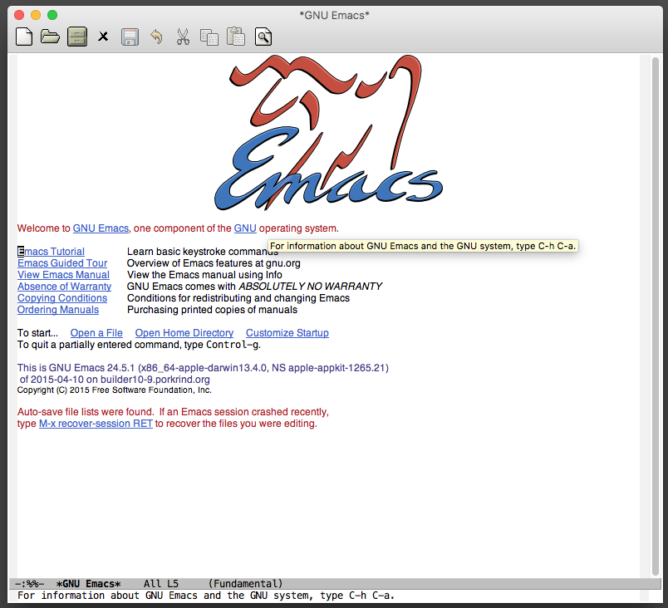
If it hasn’t been said enough times already, let it be said once more: Emacs and org-mode are quite probably the best way ever to organise your personal life.

Emacs, for starters

Emacs as a text editor is rock solid. If you have a computer where you type in text and which:

  • is web based (e.g. a chromebook)
  • has any kind of touch interface (a tablet, phone)
  • is running a heavy GUI (graphical user interface)

.. then you are certain to observe a certain lag on input. It might be very slight, but it will likely be there. I know this to be the case for many devices out there, even those which purport to be “high-end”.

With Emacs, there seems to be a much more direct connection to the keyboard: you type, text appears. You type faster, text appears faster. In fact, text is capable of appearing much more quickly than you can possibly type. This makes blogging quick and painless.

org-mode, for main course

Life in Emacs simply came to be, through org-mode. Emacs itself is amazing; org-mode made organising data even better. A quick refresher:

  • org-mode creates everything in plain text, for maximum portability between systems
  • it is known as an “outline mode” enhancement for Emacs, meaning it helps to display semi-structured text effectively
  • it allows for the creation of lists – of projects, tasks, notes, links … you name it, anything that can be represented in text
  • it is portable, allowing for synchronisation with mobile devices
  • using Emacs, it is powerful – allowing org-mode notes to interact with other aspects of Emacs
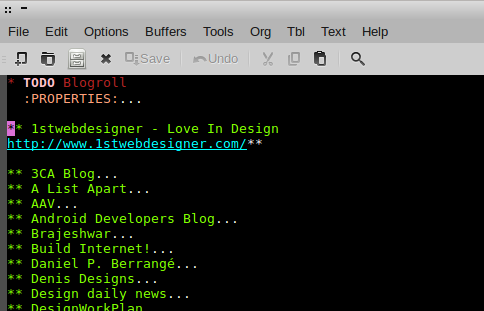
image of org-mode
org-mode in action: showing a list of links

Org-mode also supports all sorts of fancy formatting and customisation, meaning text can look good and be easy to follow.

org2blog, for desert

What would all this power be for, unless blogging! 🙂

Actually, blogging is just one activity which benefits greatly from the power of org-mode, as org’s powerful and easy formatting options are seamlessly translated into HTML and published to a blog.

In my case, I’m using a WordPress site. I create a new post using the commands

M-x org2blog/wp-login
M-x org2blog/wp-new-entry

I then type in my post and save it to a local file, using

C-x C-s

and then post it to WordPress for subsequent tweaking, with

M-x org2blog/wp-post-buffer

I can then add some final polish and check the format in WordPress before final publishing.

As a demo and an indication of speed, this blog post took only 5 minutes to write, post, edit and publish.