

I decided to challenge myself to developing a few smallish apps. Being British, one of the first thoughts that comes to mind is the weather. Whatever the situation, you can always count on the weather to provide ice-breaking conversation, or a shared sense of joy, or despair, or perhaps even wonder. The lattermost, typically, is when we see snow fall for 10 minutes.
So, now I have broken the ice with my introduction, let’s move on.
Initial concept
The idea was simple: Input a town name and receive a weather forecast. The sort of thing you get in any smartphone app or weather website these days. But I wanted to limit my scope to the UK. As it happens, I had to limit it a bit further (to exclude Northern Ireland) – which I’ll cover shortly.
For this, I needed:
- A source of location (i.e. town, city) names across the UK
- Some reference coordinates for them
- A way to request a weather forecast from “an online service somewhere”, using those coordinates
- Some way of displaying those results in a nice way to the user
First wins … and losses
Luckily, Ordnance Survey is an organisation in the UK which provides the country’s official map data. If anyone has a list of town names, it’s them. And so they do. Along with a number of other services, they provide one called OS Open Names, which provides exactly what I needed. At least, that’s what I thought.
Once I started dealing with the data, it became clear that it wasn’t quite what I was looking for.
While the data format (plain text, CSV) was ideal, what I hadn’t factored in was that OS grid references have very little to do with Lat/Long coordinates. As I’m sure you will be aware, Latitude (north-south position) and Longitude (east-west position) allow a simple, two-number reference for any position on Earth. Lat/Long coordinates are the basis of most weather data API lookups, and I had made the assumption that OS data would provide that. Alas, it doesn’t.
As I also discovered, the data only covered mainland Britain (Scotland, England and Wales) and not Northern Ireland. So, we have here a GB-based system, not a UK one.
Rationalising the data
Coming back to the data itself, some filtering and optimising was essential to make this tool usable. The search list of towns and cities needed to be as small as possible.
The initial dataset (downloaded data from OS), when uncompressed, is 1.7GB, comprising approximately) 3.04 million rows of data.
By just cutting columns, I reduced dataset to 151MB – which was much more agreeable. However, this dataset still contained superfluous rows. The OS data includes road names, numbered roads, coastal points of interest, postcodes… basically a lot of stuff that isn’t town and city names, which were to be my only search criteria.
Further reducing data by removing rows that weren’t of “populatedPlace” type reduced searchable data further, down to 2.8MB (now only 43,254 rows). This was great, but due to the oddities of searching for Lat/Long coordinates using the OS grid reference, a little data had to be added back.
A problem with location references
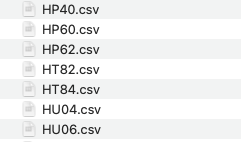
The issue I came across was that the National Grid system uses references which are comprised of three parts: a 2 letter code, a 5 digit code and another 5 digit code. The supplied data only provides two 6-digit numeric codes, not the two-letter prefix.
Looking at the source data files, I had a hunch that the two letter prefix I needed. My hunch proved correct, although I still haven’t found official documentation declaring this.
The filename being the only source of search prefix was workable, though: in each row of place name data, I appended the filename. I would use the first two letters of thatt field for my grid location reference.
But what about the numeric digits? I had two sets of 6 digits, and the examples given cited two sets of 5 digits! Luckily, our beloved ramblers came to the rescue! I found a web page that explained the OS grid reference system in easy enough terms that a luddite like me could understand.
The solution was to simply use the least significant 5 digits (the 5 on the right of the number). I then had a reference I could work with, using the OSGridConverter library that is available in Python.
A rudimentary UI
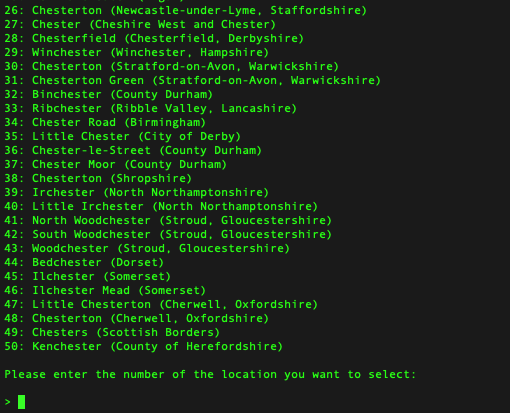
To interact with the dataset, a very simple prompt was needed. For that, I just allowed the user to nominate a place from a list, if the result list was greater than one result.
Within the terminal, a search for “Chester” results in 50 places with Chester in the name. The prompt allows the user to select one.
Coordinate & weather lookups
Converting OS grid refs to Lat/Long coords was made so much simpler with the OSGridConverter library. Once a result was returned, the final step was perform a weather lookup for those coordinates.
Fortuniately, another win was the meterological forecast lookup. Open-Meteo provided the API lookup code, in Python, ready to go. All that was needed was to plug in my own Lat/Long coordinates, perform the query and show the result.
The API query focuses on temperature, which seemed a more upbeat query than precipitation.
Despite calling this mini-app “RainyDaze”, I like how it can be easily adjusted to displaying any type of forecasteable data. I could expand upon this by prettifying the output, but at this point that’s just cosmetic; the core is now built.
Repo
You can browse the code and do whatever you want with it, starting here: https://github.com/stevedowe/rainydaze/