Now this looks promising.
FLIF is a New Free Lossless Image Format That Raises the Compression Bar

Now this looks promising.
FLIF is a New Free Lossless Image Format That Raises the Compression Bar
Photo auto-import/upload straight to cloud?
Greetings Chromies,
Advice sought please. Is there any Chrome app or extension which runs on ChromeOS and auto-imports/uploads photos straight from USB-camera or SD Card to the cloud?
Background: Got a senior relative a Chromebook about 18 months ago and she’s been loving it… until recently. What changed? Not being able to auto-upload photos to Photos, and instead having them upload to Drive. When photos used to import straight from USB camera/SD Card, things were so straightforward.
The issue here is that this change is not understood. How do you explain “well, Google used to provide this on your Chromebook, but then decided to remove that feature and there’s nothing you can do about it, despite paying good money”…?
Thanks.
There is a growing movement.
The movement is towards a free web, unimpeded by the silos that threaten to own us, and liberated from social-networking norms that diminish our individuality.
And yet, there isn’t actually one movement; there’s two. In fact, there are many more than two, but I’ll focus on just these for now.
Friendica is a social networking platform which is decentralised, distributed and fully privacy-respecting. It is, of course, open source too. Friendica’s purpose is to be an ‘alternative to those “creepy” social networks that don’t really care about your privacy’. It is primarily a web site with components that interact with other social networks (Facebook, Twitter, etc) as well as other instances of Friendica.
Friendica requires self-hosting.
Conversely, the “Indieweb” is more of a concept than a specific implementation. Its guiding principle is that “When you post something on the web, it should belong to you, not a corporation.” Although similar ideologically to Friendica, the implementation is less defined. Some people have implemented it via WordPress plugins, others through Jekyll and other static blogging systems.
Indieweb’s principles can even be implemented in “closed” systems, provided the data can always be accessed by its owner.
A 200 word post.
Free software such as Linux is great at many things, including keeping your data very safe. That is, if you are in relative control of it yourself.
Linux is also used by the likes of Google, Facebook, et al., not to mention most western governments. In fact, its flexibility, suitability and cost-effectiveness means it’s pretty much there, in most pieces of consumer electronic equipment, plus any networking kit employed in telephone exchanges and data centres, through to the end points – the receiving servers which constitute “the cloud”.
Its use and application is rich and strange: sometimes in your interests, and often, arguably, not so. But whether you’re a Linux/UNIX, Windows or Mac user, taking care of your own data is vital for a life of value!
Is it possible to retract data that you previously opted to store online, and be confident that cloud service providers no longer keep it stashed somewhere? There are two responses to this:
Let’s assume for a moment that “yes” is, by far, the prevailing truth. “Yes”, data which I previously uploaded was properly deleted when I deleted it, and an online service provider no longer has any copy, nor any meta data about my data (ok, I’m laughing now).
“there are many ways in which you can protect your data, and protect your privacy”
Many of us have done it: uploaded photos to Google Photos, posted images or event information to Facebook, shared our location on Twitter, set up an account on … well, the list goes on. But forgetting the “privacy” policy of such entities, just for a second (well, ok then – it’s not that easy to put aside “We store data for as long as it is necessary to provide products and services to you and others”, but even so!!), there are many ways in which you can protect your data, and protect your privacy. It starts with a little effort and time.
Rome wasn’t built in a day, and neither is your data security. For example, consider the following:
A friend of mine recently lost years of pristine digital photos due to a failure of company equipment (“the company laptop”) and because he hadn’t backed them up to a secondary device – even though he had one of sufficient capacity in his possession!
Don’t let this be you! Get a routine in place for backing up. Even if it’s only monthly, usually cameras and phones have enough capacity to store a month’s worth of shots.
A safe location can be anywhere. You don’t have to get a fireproof safe – although I’m not saying don’t! But if you backup your personal data at home, try not to keep your backup at home. A USB drive costs so little these days, that it’s the perfect medium for backing up photos and then taking it to work and locking in your desk drawer.
Encrypting your data is always a good idea for a removable storage device, provided you can easily remember a strong password. Although the ease of managing encrypted removable storage varies between operating systems (note, it is very easy to encrypt data on GNU/Linux).
A backup is no good if you can’t restore files from it. Luckily, with a simple backup process you can easily monitor and validate that your backups have occurred successfully. If you are confident that your system backups work ok, do another one. Then store. Wash, rinse, repeat.
By setting a rule for yourself to back-up your own data, you won’t become so dependent on cloud services for backing up your photos.
Common objections to keeping data off the cloud include the oft-argued (but ill-conceived) notion that it’s free of cost. Let’s just examine this for a brief moment:
The value of your “free” data storage is in the metadata that is stored with it. Tied to your user account (that same user account you might use to log in to other services, signifying your activity at other times even when not using the primary service…) is data – in the form of metadata – that describes it quite clearly.
That photo which was kindly synced to your cloud provider’s account will contain data, like:
If I am a massive indexing engine and I start aggregating and analysing these data, I will be able to determine some interesting trends:
we are now at a stage where it is easier to get a phone, and rely on Facebook for photo storage
Some people I know seem apathetic towards online security, and yet suspicious towards cloud service provider’s intentions too. Perhaps we are now at a stage where it is easier to get a phone, and rely on Facebook for photo storage, than to “bother” seeking alternatives. “The answer is not readily to hand, so let’s move on.”
The problem with systems is that they need parameters. Do a search on something, somewhere, and you’ll be sure to see ads and sponsored links of that thing, somewhere else. This is, and has been for a while, the new internet “norm”.
Breaking out of this “think, search (hunger); feed (consume with contextual data)” lifestyle has been described as the “search bubble”. A self-fulfilling data management and presentation matrix based on your lifestyle habits.
By adopting a simple routine such as taking care of your own data and not subscribing religiously to online services, it’s possible to find not only more sanctity in life’s unique moments, but also more richness from the due consideration of others. Where people know you a little less, and are curious to know you a little more.
Keeping life perfectly private: backup offline
Free software such as Linux is great at many things, including keeping your data very safe. That is, if you are in relative control of it yourself. Linux is also used by the likes of Google, Facebook, et al., not to mention most western governments. In…
http://stevedowe.me/2015/09/keeping-life-perfectly-private-backup-offline.html
<img class="alignnone" src="https://lh3.googleusercontent.com/-VX6GdlIv_JQ/VdowckFdpiI/AAAAAAAF2TM/g9p1T-9VJ2Q/s0/fb.webp" alt="" />
What’s going on with Facebook’s suggested friends feature…?
I use my phone for personal and business reasons, so I have a number of contacts on my phone relating to work, most of whom I would never “friend request” on Facebook.
Also on my phone is my Google+ “following” list – i.e. people I follow. These people too I would never befriend on Facebook because, well, there’s no point!
Yet, recently, people have started appearing in my Facebook “suggested friends” list, the details of which can only have come from my phone’s Contacts. For instance, an old neighbour’s profile has appeared, whose only details I had were his mobile phone number – NO other social connection.
Then, people only in my G+ circles who I would have absolutely no connection with on Facebook, even in an extended network, started making an appearance. This seems to be people who are also quite prominent on G+; those who make a number of posts a week, or even per day.
Now, even a client’s profile has made a recent appearance. This is decidedly awkward, not to say infuriating.
I had never permitted the “Continuous Upload of Contacts” feature in Facebook, nor uploaded manually any contacts. I do acknowledge and accept that the app used the Contacts permission in order to access my addressbook, for writing to, but I am now wondering, was it uploading my addressbook without my knowledge or consent?
It seemed to get worse when I removed the Facebook app from my phone, but the problem was already present. How else could this be explained? Is Facebook scraping the web for my other social connections? How could it otherwise know about my client or my old neighbour?!
I posted these thoughts on Facebook and at least one friend on there has confirmed he has observed the same change in his “suggested friends” list.
Very interested to know if anyone else is seeing this…
_(Img via: https://play.google.com/store/apps/details?id=com.facebook.katana&hl=en_GB)_
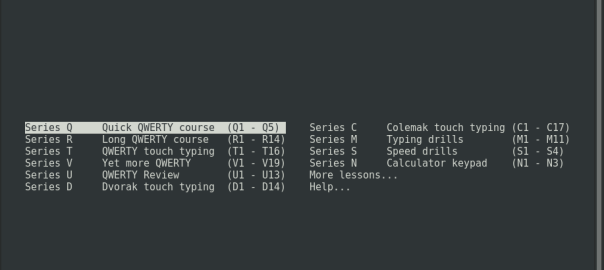
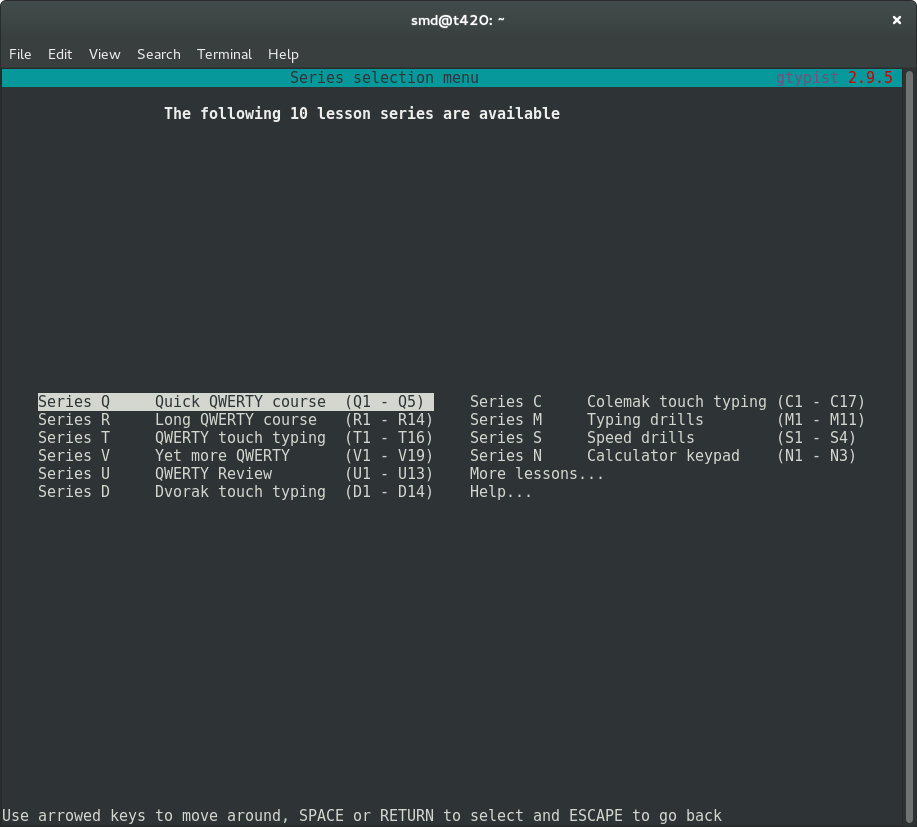
Looking for a free software program to help me learn to touch-type, and shortly after my search started I found GNU Typist. And GNU Typist (gtypist) is a gem.
The instructions are simple and the purpose of the program is equally simple: to “condition” the user into adopting and maintaining good typing habits. After starting the basic lessons (“Quick QWERTY course”), it soon became clear that my touch-typing capability was far poorer than I had hoped and my typing speed these days is generally just luck-driven.
Thankfully, a considerate fellow called Simon Baldwin decided to write gtypist, and here we are. The online documentation is equally useful; not only do you get help regarding how to acquire, install and invoke gtypist on your machine, but also a list of alternative free software typing programs which are a good fit in various situations (general, education, games-playing, etc). Like most GNU software, a man page is also provided.
It is so easy to take this effort for granted, and yet how useful is this resource! Such is the way with free software: quite often, somebody already had that itch and had to scratch it.
Improving typing accuracy with gtypist
Looking for a free software program to help me learn to touch-type, and shortly after my search started I found GNU Typist. And GNU Typist (gtypist) is a gem. The instructions are simple and the purpose of the program is equally simple: to “condition”…
http://stevedowe.me/2015/08/improving-typing-accuracy-with-gtypist.html