Keeping life perfectly private: backup offline

Free software such as Linux is great at many things, including keeping your data very safe.  That is, if you are in relative control of it yourself. Linux is also used by the likes of Google, Facebook, et al., not to mention most western governments.  In…

http://stevedowe.me/2015/09/keeping-life-perfectly-private-backup-offline.html

    <img class="alignnone" src="https://lh3.googleusercontent.com/-VX6GdlIv_JQ/VdowckFdpiI/AAAAAAAF2TM/g9p1T-9VJ2Q/s0/fb.webp" alt="" />

What’s going on with Facebook’s suggested friends feature…?

I use my phone for personal and business reasons, so I have a number of contacts on my phone relating to work, most of whom I would never “friend request” on Facebook.

Also on my phone is my Google+ “following” list – i.e. people I follow.  These people too I would never befriend on Facebook because, well, there’s no point!  

Yet, recently, people have started appearing in my Facebook “suggested friends” list, the details of which can only have come from my phone’s Contacts.  For instance, an old neighbour’s profile has appeared, whose only details I had were his mobile phone number – NO other social connection.  

Then, people only in my G+ circles who I would have absolutely no connection with on Facebook, even in an extended network, started making an appearance.  This seems to be people who are also quite prominent on G+; those who make a number of posts a week, or even per day.

Now, even a client’s profile has made a recent appearance.  This is decidedly awkward, not to say infuriating.

I had never permitted the “Continuous Upload of Contacts” feature in Facebook, nor uploaded manually any contacts.  I do acknowledge and accept that the app used the Contacts permission in order to access my addressbook, for writing to, but I am now wondering, was it uploading my addressbook without my knowledge or consent?

It seemed to get worse when I removed the Facebook app from my phone, but the problem was already present.  How else could this be explained?  Is Facebook scraping the web for my other social connections?  How could it otherwise know about my client or my old neighbour?!

I posted these thoughts on Facebook and at least one friend on there has confirmed he has observed the same change in his “suggested friends” list.

Very interested to know if anyone else is seeing this…


_(Img via: https://play.google.com/store/apps/details?id=com.facebook.katana&hl=en_GB)_

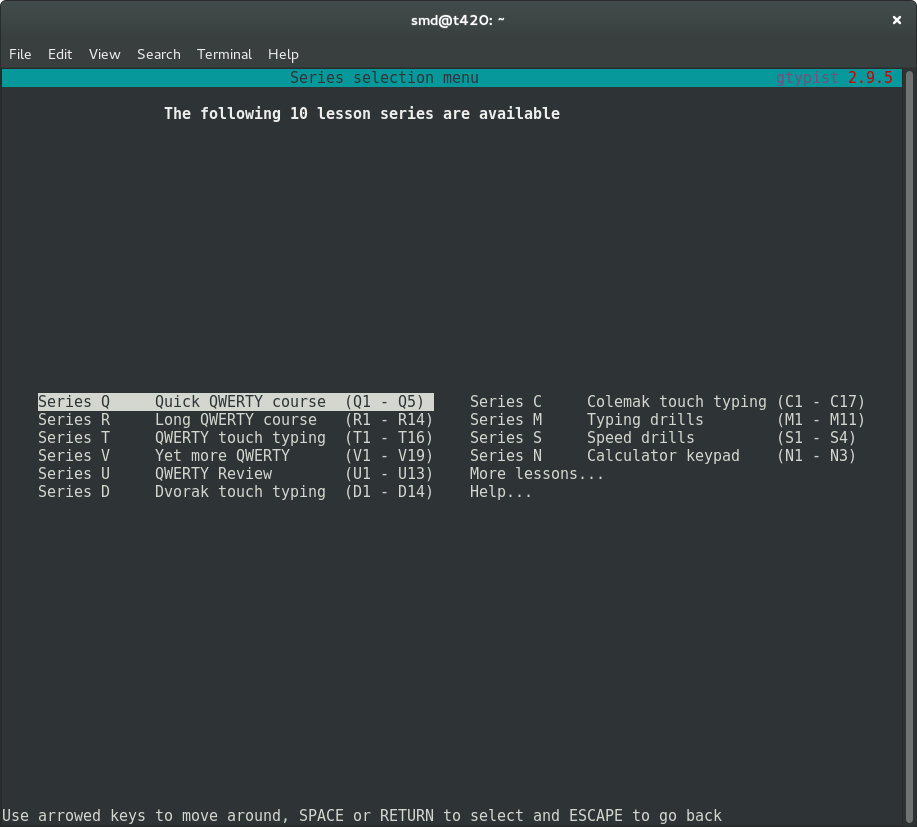
Gtypist menu options
GNOME Terminal showing gtypist menu

Looking for a free software program to help me learn to touch-type, and shortly after my search started I found GNU Typist.  And GNU Typist (gtypist) is a gem.

The instructions are simple and the purpose of the program is equally simple: to “condition” the user into adopting and maintaining good typing habits.  After starting the basic lessons (“Quick QWERTY course”), it soon became clear that my touch-typing capability was far poorer than I had hoped and my typing speed these days is generally just luck-driven.

Thankfully, a considerate fellow called Simon Baldwin decided to write gtypist, and here we are.  The online documentation is equally useful; not only do you get help regarding how to acquire, install and invoke gtypist on your machine, but also a list of alternative free software typing programs which are a good fit in various situations (general, education, games-playing, etc).  Like most GNU software, a man page is also provided.

It is so easy to take this effort for granted, and yet how useful is this resource! Such is the way with free software: quite often, somebody already had that itch and had to scratch it.

    Improving typing accuracy with gtypist

Looking for a free software program to help me learn to touch-type, and shortly after my search started I found GNU Typist.  And GNU Typist (gtypist) is a gem. The instructions are simple and the purpose of the program is equally simple: to “condition”…

http://stevedowe.me/2015/08/improving-typing-accuracy-with-gtypist.html

Jetpack's homepage is your standard, modern affair.
Jetpack’s homepage is your standard, cloudy affair.

If you are a blogger, and you use WordPress, you will undoubtedly heard of Jetpack Jetpack for WordPress provides a ton of enhancements to any WordPress install.   Among the goodies is something for the socialite in all of us: the ability to automatically “broadcast” our blog posts to social networks, including Facebook, Twitter, LinkedIn and Google+, via the Publicize feature.

All this free stuff of course comes with a “price” – having a user account on WordPress.com itself.   But, if you are a blogger – or at the very least you read other people’s blogs and contribute comments – this is not exactly a hardship.

Set-up and Testing

Setting up Jetpack is as easy as installing a WordPress plug-in.  If you are familiar with the process, you will probably have already seen Jetpack in the Add Plugin page.

The Publicize feature is equally easy to set up:  you simply click on the button corresponding to the social network you wish to link with, a page/pop-up opens to allow you to authenticate with that social network, and then you return to the Publicize page with a “Connected as…” confirmatory message.

Jetpack confirming account connections.

The next step is to write a post and then publish it.  Simple, huh?  Well, not quite.

Content Formatting

Due to the different ways social networks publish posts, your “write once, publish many” WordPress post may need a little tweaking before it looks as good as possible.

Google+

Image of G+ post
Google+ rendered my blog post with lots of ! 😐


Facebook


Facebook produced a worthwhile post, with backlink.

Twitter

Twitter rendered my image sideways
Twitter did what it does best: stays brief

Links:

plus.google.com/+SteveDowe/posts/5eSkkPVLAfb

twitter.com/doweio/status/629950053499584512

Further Testing

Finding the most effective way to post requires more testing.  My main aim was to find a way in which one post can look great on the three main social platforms (Google+, Twitter and Facebook – not that I care too much about the latter).

[ This is a legacy-published post, originally written but unpublished on 13 August 2015.  Some details may not longer apply to recent software releases. ]

Seems that my clever little spelling ideas have fallen foul of the English language yet again!

I believed that a double-S in a word (like “hiss“) always requires a soft “ssss“, whereas a single-S is harder – a bit like “szszsz“.  But no.  That would be too easy.

Take “issue” (I do, quite often – but anyway..).  You could say “i-shu” or “iss-yu“.  But what about “dissolve” (“dizz-olve“) – that conflicts with my rule, although “dissolution” (“diss-o-lu-shun“) doesn’t.

Disappear ?  Soft “ssss” – again, a conflict.  Occasion?

Yes, I really could not think of a better title for this. 🙂

Recently I added a new drive, connected by USB, to a test server. It was for sharing with a virtual machine running on that server.

Chain of oops

When I connected the drive to the host, I decided to create a volume group and logical volume on it. This would have been fine, were it not that I then attempted to mount this logical volume in the host, rather than the guest.  The problem, as I later discovered, was that I’d created a volume group in the host, with the same name as a volume group in the guest.  Again, this would have been fine on its own, but the chain of errors was complete when I made the following next moves:

  • Shared the physical disk with the virtual machine
  • Activated the LVM volume group on the physical disk inside the virtual machine’s operating system (debian)

To its credit, LVM seemed to handle this quite well, and (if memory serves) merged my new logical volumes into one great volume group.

Identity crisis

Switching between different “hosts” (physical host and virtual guest) to edit logical volumes is not very clever, though.  The reason is that lvm, within an operating system with drives available at certain locations, will update those drives’ metadata where each drive is a physical disk that is assigned to a volume group.

Let me put this another way:  if you have /dev/sda1, /dev/sdb1 and /dev/sdc1 all as PVs (physical volumes) that belong to a VG (volume group), then making a change to the volume group – e.g. something simple like vgrename – will affect those three physical volume’s metadata.

Now, once you have finished doing this in the physical host and start playing around with the VG in your guest’s operating system, things aren’t going to look quite right.  If you exported /dev/sdc1 from the host to the guest, the guest might:

  • recognise the device at another location, such as /dev/sdb1
  • look at it with lvm and wonder where /dev/sda1 and /dev/sdc1 are…
  • let you edit this physical volume’s metadata (using LVM tools) in such a way that you cause further problems for yourself back in the physical host, if you planed to share it back there again.

The golden rules for an easy life, so far, are:

  • Don’t share volume groups and logical volumes between hypervisors and guests.
  • You can share a physical disk to a guest, but if you intend to use a logical volume on it within the guest, create it within the guest.  And use it only within the guest.
  • If you must manage and share logical volumes from the host to the guest, use NFS.

If you have already created a nightmare of “unknown” disks and missing PVs…

It’s not too difficult to remedy a tricky situation with messed up volume groups.  If you are absolutely, positively, 100% certain that you no longer require the missing physical volumes in your VG, then there are actually only three (or four) commands you need:

# lvm vgreduce --removemissing -f <volume group name>

This attempts to remove the missing PVs from your VG and writes an up-to-date config file in /etc/lvm/backup/.  If you inspect that file you’ll see a physical_volumes { } stanza which encompasses the physical volumes now remaining in your VG.

However, pay close attention to the status attribute of each PV.   You may also see the remaining entry has:

status = ["MISSING"]

If you then attempt a

# vgchange -ay <volume group name>

you may find that the VG will not become active and this file again contains several entries, related to the missing PVs that you thought you’d just removed.  The reason for this is that the remaining PV(s) have old meta-data which hasn’t been updated by LVM when you did that lvm vgreduce, earlier.  Fear not.

Issue:

# lvm vgextend --restoremissing <volume group name> /path/to/PV

e.g. /path/to/PV might be /dev/sdb1 – you’ll need to know this, no guesses 🙂

After this, inspect the backup config file that you looked at previously.  The status should have changed from “missing” to “allocatable”.  However, the missing PVs will still be present, so let’s get rid of them:

# lvm vgreduce --removemissing -f <volume group name>

Now take one more look at that config file.  It should just contain the PVs that are present and assigned to your VG.

Try activating the VG:

# vgchange -ay <volume group name>

1 logical volume(s) in volume group "<volume group name>" now active

If you’ve got this far, you’re basically on the home straight.  Simply mount the LV on the file system and away you go!