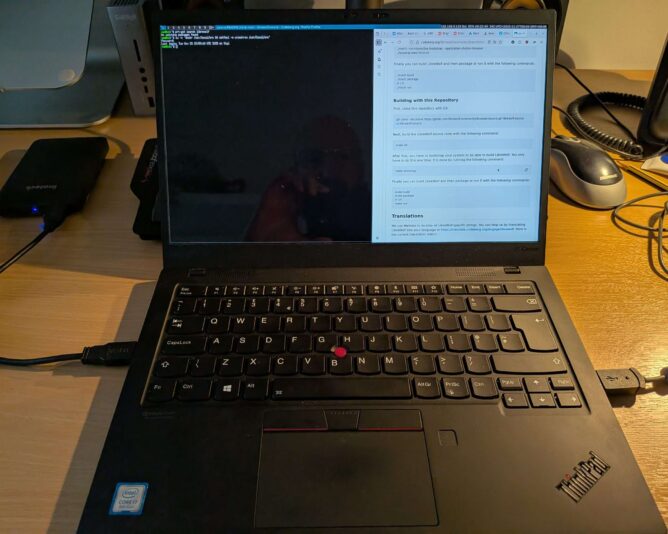
Laptop with suckless environment

I decided to trial CRUX on my laptop. For the uninitiated, CRUX ‘is a lightweight Linux distribution for the x86-64 architecture targeted at experienced Linux users. The primary focus of this distribution is “keep it simple” ‘. (CRUX handbook)

The aims of this exercise are twofold:

  1. Achieve a singular focus on software and system management. I want only the software I want on my laptop to be on my laptop. Nothing more. I don’t need to install games, for example. Sadly, I don’t have time for that.
  2. Take this minimalistic journey to its conclusion, by running a suckless environment. Suckless software (unencrypted link) is ‘the home of quality software such as dwm, dmenu, st and plenty of other tools, with a focus on simplicity, clarity and frugality. Our philosophy is about keeping things simple, minimal and usable.‘ (suckless philosophy)

The combination of CRUX and Suckless software means that a lot of compilation of source code is expected. This is fine – it promotes a journey into better understanding of “the UNIX way” and grasping the concepts behind the shell and userspace more closely.

It’s minimalist, which is what I like. Truth is, like most people, I’m easily distracted. Give me a little stress and I can find many other things to do (like write this blog?!) instead of the work in front of me. Running the most minimalistic computer environment is that my attention has little chance to wander. No distractions. No notifications. Just singular purpose – the tasks to be achieved.

Baby steps

The first step in setting up a CRUX system is installation. Easy, one might say. To some extent this is true: the documentation is written very well; you can tell it has been honed over successive generations into a terse, reasonably compact yet sufficiently detailed tome of guidance on how to set up your machine. Unfortunately, I failed at my first endeavour, and ended up with an unbootable system. The reasons were several:

  • I made a simple, schoolboy error with the syslinux bootloader, naming my kernel image vmlinuz-6.12.23.img. This is incorrect according to the syslinux documentation, as I later discovered. Only initramfs images can have the .img filename extension. Once corrected, the system actually booted but soon ran into another problem.
  • I inadvertently stripped back the kernel too much when compiling it, removing (or not adding) key items like framebuffer support and the intel i915 graphics driver. This made early-boot diagnostics very difficult, because errors would scroll by, off-screen, before I could read and understand them.
  • Furthermore, I stumbled upon a weird situation with dracut/initramfs. When running through the early boot process, it mounted /usr (which was a separate LVM volume on my SSD) into the early-boot environment, but then didn’t unmount it before running switch_root. switch_root is the process that gets executed as a final “handover” to the Linux kernel, allowing it to continue the boot process by providing mounted drives that are ready for init (pid 1) to be executed. Because /usr was mounted, a filesystem check could not be performed on it before mounting, which halted the boot process. I need to re-test this before considering raising a bug report.
  • The combination of the above factors meant that I couldn’t see the fsck issue occurring when starting up the system, and instead was left with a system that (after bootloader issue was resolved), didn’t tell me a lot about why it wasn’t booting. Yuck!

RTFM, again

In case you have stumbled upon this page and think “that sounds like what’s happening to me”, let me point you to the very helpful additional documentation:

This documentation, in addition to the CRUX handbook, got me through. It’s very useful to understand where the rd.* variables live (and why), and what options you have to improving the boot environment to help with early analysis and debugging of your set-up.

Next steps

My bootable CRUX system currently lives on an external SSD, in a USB enclosure. My intention is that once that environment is functionally equivalent to my current Debian 13-based laptop, I’ll do a disk-switch by backing up my laptop image (the whole image, as one file, to another external disk) and then run through the installer one last time, properly setting up the laptop SSD with a new partition table, boot sector and fully-sized luks-encrypted volume that will contain all my data.

Once the basics have been set up, I’ll then boot into a rescue environment and copy verbatim all files from the external USB CRUX drive’s logical volumes to my internal laptop drive’s LVs. It’s slow-going, but a much more measured approach which I have to remind myself is the right way to go, here. (One is perhaps a bit impatient at times … ahem).

I’ll write a follow-up post when getting nearer to the switch over.

Why all this effort?

Like many people, I firmly believe in the following principles:

  • privacy-first computing: that you should opt to share any data from your computer, to any person or organisation. Not have to “opt out” (how can you opt out if you never opted in, I wonder?!)
  • digital-minimalism: install and run the software you need, and that’s it
  • learning-focused: create an environment that cultivates and encourages learning. Avoid the temptation of environments that “just work”.
  • community-powered: this is a way I can contribute back to the community of developers and creators whose hard work provides me with the freedom of choice.

Life is too short not to align with your values. That’s the CRUX of it.
Minimalist image by Ovan (https://www.pexels.com/u/knownasovan/)

Marie Kondo’s bestseller, The Life Changing Magic of Tidying Up, is quite an inspiration. She takes what is, essentially, a slightly mundane activity – decluttering – and transforms it into a ritual; a rite of passage for one who wants to transcend from disorganised hoarder, to cleansed, enlightened minimalist.

Ok, perhaps that is slightly strong an example, but this is the idea.  The KonMari method of tidying is quite simple: do this, then do that.  Kondo hand-holds her reader through the treacherous caverns of uncertainty and out into a bright, new world.  Her two basic tenets are, that one must organise (and purge) by category, not by room, and that one should also focus on what to keep, but only if it “sparks joy”.

It’s simple, but it works – and surprisingly well, too. When followed correctly, it’s an efficient way to declutter, reorganise, and reset.

Starting the Journey

Getting started is remarkably easy.  KonMari dictates that purging one’s superfluous clothing is the best starting point.  I’d agree.  It’s interesting how you can start clinging on to item from your past, instead of looking forward to wearing something in the future!

I have since discovered what I like, what suits me, and what I feel comfortable in

It’s surprisingly easy to start in this way.  It teaches very effectively to be selective and mindful about what you keep for your wardrobe, and why.  The key lesson, letting go, is learned here.

Like many minimalists, I have since discovered what I like about my clothing, what I think suits me, and – perhaps most importantly – what I feel comfortable in.  And, like many, my wardrobe now features a number of more plain black, grey and white items.  But I don’t subscribe to monotone styling; blue is the colour I love, so I have a lot of blue in my wardrobe too, plus warmer hues.

Minimalism, to me, is far more about quantity.  It doesn’t mean I need to sacrifice style.

Decluttering the House

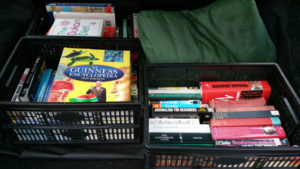
Decluttering produced these three boxes of books
Many old books, that no longer “spark joy”, being taken to my local library. Decluttering FTW!

After clothes comes the decluttering of books, paperwork, CDs/DVDs and miscellanea (random bits and pieces, called komono by Kondo). How much you have kept will determine how long this takes.  But a little dedication can bring surprisingly quick results.  Several hours are really all that’s needed for decluttering.

Five bin bags of clothes, and four boxes of books later, I feel well on my way to simplifying and minimising.

And what a great feeling, being unburdened.  

As I proceeded with old paperwork, the voice in my mind became yet more balanced.  I had to double-check on certain items, and felt freedom and empowerment to change my mind part way through – sometimes choosing to discard what I initially wanted to keep, and vice versa.  This process is mentally decluttering, and (if I were spiritual), spiritually cleansing.

Decluttering the Mind

Computing, for me, is a big thing.  As soon as I could record stuff on computer, I did.  I have databases and documents dating from the early 1990s onwards. Sadly, the file formats used for those documents are not widely supported any more.

This creates a problem: Do I keep those old documents, which probably serve no purpose to me now? If not, why did I keep them for so long? Or, do I go to the trouble of getting an older computing platform to convert them from, into a more modern, or at least less-encumbered, file format? Do I still need them? Will I ever? Or do I just archive them all off and save myself the time and effort?  (Do you see how all this digital clutter is causing angst and complexity?  Why am I thinking about this stuff…? etc.)

These questions have haunted me for quite some time, but eventually I came to realise that while it would be nice to have access to all my data, in reality, I don’t need it. And having access to it would increase the amount of digital clutter that I don’t need to be concerned with.

Am I Swapping Physical Hoarding for Digital Hoarding?

Although previously I wanted to convert all my old files into modern formats, I am beginning to realise that there really is little benefit to doing this.  Up to roughly 1999, I would have used my Amiga computer for word processing and other work (e.g. editing images).  When I got a PC in 2000, and installed SuSE Linux 7.2, I started using StarOffice (the precursor to OpenOffice/LibreOffice) instead.  StarOffice files are still supported in modern versions of LibreOffice, much to my delight.

But for pre-2000 data, I must accept that without significant time, energy and devotion, I cannot easily liberate my files.  This means all my university essays, college assignments, personal notes, documents, databases, images and other data are now part of that fabric of digital cruft.  The best I can do is securely archive them off, hoping that one day an easy conversion solution will be available.

Yet, in some ways, this is for the best.  What good does reading my own essay on Chaucer do, for me, in 2017? I am too busy with other things that are contemporary and relevant, right now, to indulge in that.  Digital decluttering is as important as physical decluttering.

Closing Thoughts

I have observed that, during this decluttering process so far, I have had a tendency to hang on to things because of their value to me in the past.  My mindset in the present has been influenced by past events, of course, but this has also lured me into some complacency with regard to my beliefs and philosophy on life.

When we start becoming defined by the things we have, instead of the things we do, there is little value in “having” those things whatsoever.

I am looking forward to doing more, and having less.


Have you had a similar experience with de-cluttering?  Please comment – I’d love to hear about it!

I am ahead of schedule!  With a little spare time I wasn’t anticipating, I am decluttering my blog.

I have found a number of posts that have been orphaned (having no category set) plus a whole load of drafts that should have been published and – for some reason – never were.

Commence Operation: Rapid Cleanse!