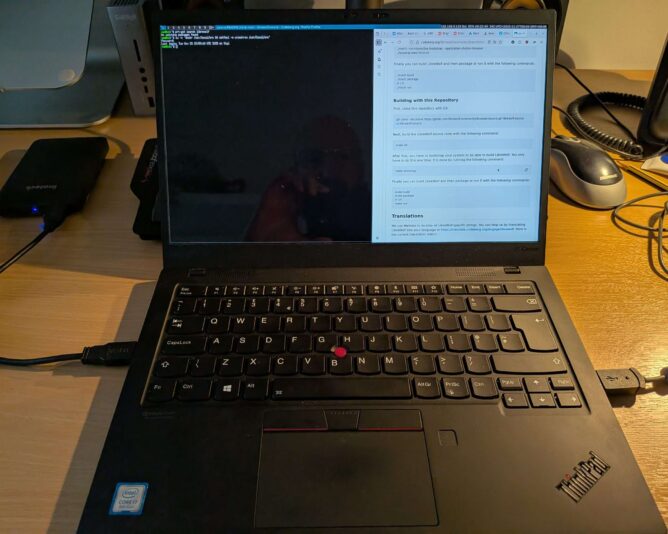
Laptop with suckless environment

I decided to trial CRUX on my laptop. For the uninitiated, CRUX ‘is a lightweight Linux distribution for the x86-64 architecture targeted at experienced Linux users. The primary focus of this distribution is “keep it simple” ‘. (CRUX handbook)

The aims of this exercise are twofold:

  1. Achieve a singular focus on software and system management. I want only the software I want on my laptop to be on my laptop. Nothing more. I don’t need to install games, for example. Sadly, I don’t have time for that.
  2. Take this minimalistic journey to its conclusion, by running a suckless environment. Suckless software (unencrypted link) is ‘the home of quality software such as dwm, dmenu, st and plenty of other tools, with a focus on simplicity, clarity and frugality. Our philosophy is about keeping things simple, minimal and usable.‘ (suckless philosophy)

The combination of CRUX and Suckless software means that a lot of compilation of source code is expected. This is fine – it promotes a journey into better understanding of “the UNIX way” and grasping the concepts behind the shell and userspace more closely.

It’s minimalist, which is what I like. Truth is, like most people, I’m easily distracted. Give me a little stress and I can find many other things to do (like write this blog?!) instead of the work in front of me. Running the most minimalistic computer environment is that my attention has little chance to wander. No distractions. No notifications. Just singular purpose – the tasks to be achieved.

Baby steps

The first step in setting up a CRUX system is installation. Easy, one might say. To some extent this is true: the documentation is written very well; you can tell it has been honed over successive generations into a terse, reasonably compact yet sufficiently detailed tome of guidance on how to set up your machine. Unfortunately, I failed at my first endeavour, and ended up with an unbootable system. The reasons were several:

  • I made a simple, schoolboy error with the syslinux bootloader, naming my kernel image vmlinuz-6.12.23.img. This is incorrect according to the syslinux documentation, as I later discovered. Only initramfs images can have the .img filename extension. Once corrected, the system actually booted but soon ran into another problem.
  • I inadvertently stripped back the kernel too much when compiling it, removing (or not adding) key items like framebuffer support and the intel i915 graphics driver. This made early-boot diagnostics very difficult, because errors would scroll by, off-screen, before I could read and understand them.
  • Furthermore, I stumbled upon a weird situation with dracut/initramfs. When running through the early boot process, it mounted /usr (which was a separate LVM volume on my SSD) into the early-boot environment, but then didn’t unmount it before running switch_root. switch_root is the process that gets executed as a final “handover” to the Linux kernel, allowing it to continue the boot process by providing mounted drives that are ready for init (pid 1) to be executed. Because /usr was mounted, a filesystem check could not be performed on it before mounting, which halted the boot process. I need to re-test this before considering raising a bug report.
  • The combination of the above factors meant that I couldn’t see the fsck issue occurring when starting up the system, and instead was left with a system that (after bootloader issue was resolved), didn’t tell me a lot about why it wasn’t booting. Yuck!

RTFM, again

In case you have stumbled upon this page and think “that sounds like what’s happening to me”, let me point you to the very helpful additional documentation:

This documentation, in addition to the CRUX handbook, got me through. It’s very useful to understand where the rd.* variables live (and why), and what options you have to improving the boot environment to help with early analysis and debugging of your set-up.

Next steps

My bootable CRUX system currently lives on an external SSD, in a USB enclosure. My intention is that once that environment is functionally equivalent to my current Debian 13-based laptop, I’ll do a disk-switch by backing up my laptop image (the whole image, as one file, to another external disk) and then run through the installer one last time, properly setting up the laptop SSD with a new partition table, boot sector and fully-sized luks-encrypted volume that will contain all my data.

Once the basics have been set up, I’ll then boot into a rescue environment and copy verbatim all files from the external USB CRUX drive’s logical volumes to my internal laptop drive’s LVs. It’s slow-going, but a much more measured approach which I have to remind myself is the right way to go, here. (One is perhaps a bit impatient at times … ahem).

I’ll write a follow-up post when getting nearer to the switch over.

Why all this effort?

Like many people, I firmly believe in the following principles:

  • privacy-first computing: that you should opt to share any data from your computer, to any person or organisation. Not have to “opt out” (how can you opt out if you never opted in, I wonder?!)
  • digital-minimalism: install and run the software you need, and that’s it
  • learning-focused: create an environment that cultivates and encourages learning. Avoid the temptation of environments that “just work”.
  • community-powered: this is a way I can contribute back to the community of developers and creators whose hard work provides me with the freedom of choice.

Life is too short not to align with your values. That’s the CRUX of it.
As with all its services, Apple offers no real troubleshooting when iCloud Drive synchronization stalls in macOS. Glenn Fleishman encountered a problem that took months to diagnose and fix. In the process, he went through the wringer of trying nearly everything suggested online, via Apple support, and from colleagues. In the end, the magic that fixed it was undisclosed engineers.

Source: Cloudy with a Chance of Insanity: Unsticking iCloud Drive – TidBITS

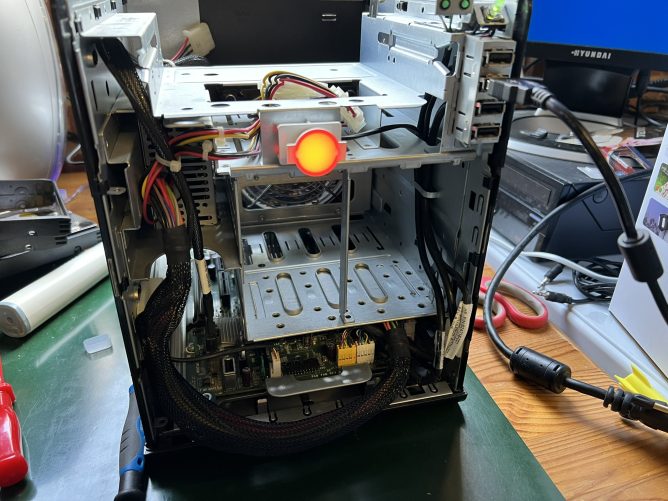
Stripped-down HP MicroServer showing a red LED (critical error)

After half-term week, where the hope of getting “adulty” things done gently fades into obscurity, I was chomping at the bit to crack on with tasks. I had various tasks ahead of me:

  • Strip down and attempted to repair MS03
  • Install on three MicroServers
  • Tidy and organise all cabling at the back of the cabinet
  • Factory-reset the

Sick server

A little background: I obtained three (Gen8 – N54L) servers on Ebay for a compelling price, each with 16GB memory. The intention was to set up a lower-power for development and testing.  I also didn’t have a single machine powerful enough, and capable of being upgraded with enough memory, to virtualise this.

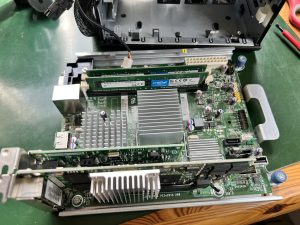
HP Microserver N54L mainboard with PCIe network cards installed
Laid bare: N54L Microserver system board

The HAL (red) light in the featured image … this is basically the server telling me it’s poorly. I’ve replaced the CMOS coin battery and also tried resetting the CMOS itself using the CMOS reset jumper position and power-cycling the machine, but to no avail. Perhaps the PSU is borked. I won’t know until I can get my multimeter on the pins, and I won’t do that until I have the PIN-out specs from somewhere…

Better cabling

Blowing my trumpet here, but the cable organisation at the back of the cabinet is a million times better. Literally a million. Ok, perhaps a few hundred. I know, I know … “photo or it didn’t happen”. I’ll get around to it.

Other tasks & things

  • Proxmox is now on three Microservers – hurrah
  • Discovered that #USB sticks can go into ReadOnly mode (the whole stick, not just a partition/mount).  This can happen if the stick is beginning to fail.
    • This discovery was prompted by the fact that I couldn’t install Proxmox on one USB stick. After reading #reddit on the matter, I have decided to reinstall Proxmox to spinning 3.5-inch disc instead.
  • Firewall – hooray! No need to find the null modem cable and do this via the console / a terminal on another machine – although that would probably have been fun.
  • Giving some thought to the most optimal use of disks. I have so many hard disks, or all ages and capacities. Nearly all of them are SATA; only one PATA drive around now.

Person typing content into Wordpress

Amber Case talks about the Rise of the IndieWeb; a loose confederation of web developers who are liberating their data in the modern web.

From 2014, and still relevant.

Source: The IndieWeb, Revolution, and Other Reasons You Should Learn to Code – The Electric Abacus

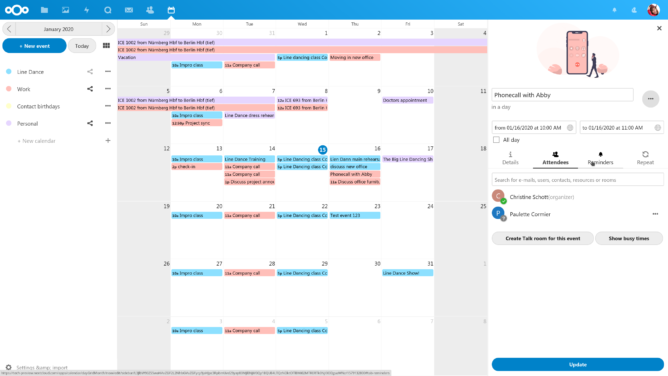
Calendar interface in Nextcloud

The problem with purism

At heart, I’m a Linux guy.  For many tasks, I use Emacs (a popular editor among some developers due to its extensibility), with Orgmode as my primary means of managing tasks, recording time, jotting down notes and, at times, trying to manage my calendar.

But there were several problems with this. Firstly, the only mobile client to sync Orgmode files with reasonable reliability, was MobileOrg.  Sadly, this project has been discontinued for a while, and to my knowledge it hasn’t yet seen a superior successor.  In addition, Orgmode is a great calendar within Emacs, but it’s not so strong outside. And while MobileOrg was “ok”, it didn’t present information in a convenient, easily-interpreted way.

In short, having a text-only, Linux/Android-only solution, was awkward.

The compromising advantage

Part of the appeal of Orgmode and MobileOrg was being able to keep all data within one’s own infrastructure.  As one of MobileOrg’s features is to “sync files from an SSH server”, and Emacs has TRAMP for accessing network locations, this made it possible to get each end talking with the other, and the synchronisation was generally reliable.

But in some ways, using Emacs, Orgmode and MobileOrg – to achieve data security and ultimate privacy – is arguably a case of the tail wagging the dog.  Was this the only private-data solution? Probably not. Was it the most convenient?  Was Orgmode the right tool for many of life’s repeatable, short-lived events? Definitely not.

image of org-mode
org-mode in action: showing a list of links

Despite trying to use only free, libre & open source software to address this requirement, around 2016 it started becoming clear that simpler solutions existed – albeit involving proprietary software of some kind.  Certain diehards might scoff that, if some software only exists in proprietary form, it’s inherently evil and you must build a free/libre version. But such ideals are rarely achievable when your needs as a new parent and business owner outweigh most others.

As I pondered my motives, it became clear to me that controlling my data was more important to me than controlling the tools.

The next move

For years on Android, I used CalDav and CardDav syncing tools, which were proprietary plugins that presented calendar and contact “providers” to the OS.  These worked great, but finding equivalent staples on Linux was somewhat harder.  The time had arrived when I needed desktop access to calendar, task and contact management, that wasn’t based in an Office365 tenancy.

The right move here was to set up Nextcloud. On my small personal hosting box at DigitalOcean [discount referral link], I set up a virtual server to run Nextcloud.  Nextcloud provides calendar, tasks and contact databases that are conveniently accessible through CardDav & CalDav.

As I had to work on a Mac in order to test websites in Safari (which accounted for at least 9% of traffic, and often more), it was useful to have syncing of this data there too.  And this, unlike some of my earlier grumpiness with all things Mac, was actually a pleasant surprise: macOS actually had great support for CalDav and CardDav.

Conclusion

Account set-up in iOS
Setting up access to other services is a cinch in iOS.

Do I get the solution I need? Yes. Does it sync well? Yes. Am I happier? Yes.

Not only that, but the downside of Orgmode syncing was that it worked best if restricted to two-way communications. If you added a third or fourth client and tried syncing between all of them, it would quickly become a clusterfunk.

Is Apple the enemy?  Well, probably. But better the devil you know, sometimes. Due to the ease of synchronisation with tasks, contacts and calendar in macOS, I slowly warmed up to the idea of replacing my ageing Samsung Galaxy Note 4 with an iPhone. So I did.  And arguably, for this requirement, it was a good choice.

Does this mean I’m no longer a Linux guy? Oh no, not at all. I still have my ThinkPad T420S, which was a side-grade replacement for my chunky T420. I use it every day in my work as a Senior Systems Administrator, for one of the UK’s top universities. I still use Emacs and Orgmode as a daily driver for tasks and coding.

But at home, my wife and I share a calendar and contact list across Android and iOS, thanks to the support of industry standard protocols.

Controlling where the data is has served us pretty well.

Reddit threadsters are suggesting that certain 5400rpm 8TB Western Digital drives are actually rotating faster, at 7200rpm, and using startup sound profiles to back up their claims. There are a group of reddit threads, like this one by u/sbjf, saying WD 8TB EMAZ and EZAZ drives, used in WD’s Elements and My Book external storage…

via What madness is this? WD 5400 rpm 8TB drives sound like faster 7200 rpm spinners — Blocks and Files